
Linux Environment Variables
Global variables
The global variables will be inherited by child processes.
You can create a global variable for your current session doing:
export MYGLOBAL="hello world"
echo $MYGLOBAL #Prints: hello world
This variable will be accessible by your current sessions and its child processes.
You can remove a variable doing:
unset MYGLOBAL
Local variables
The local variables can only be accessed by the current shell/script.
LOCAL="my local"
echo $LOCAL
unset LOCAL
List current variables
set
env
printenv
cat /proc/$$/environ
cat /proc/`python -c "import os; print(os.getppid())"`/environ
The contents of /proc/*/environ are NUL-separated, so these variants are usually easier to read:
tr '\0' '\n' </proc/$$/environ | sort -u
tr '\0' '\n' </proc/<PID>/environ | sort -u
If you are looking for credentials or interesting service configuration inside inherited environments, also check Linux Post Exploitation.
Common variables
From: https://geek-university.com/linux/common-environment-variables/
- DISPLAY – the display used by X. This variable is usually set to :0.0, which means the first display on the current computer.
- EDITOR – the user’s preferred text editor.
- HISTFILESIZE – the maximum number of lines contained in the history file.
- HISTSIZE – Number of lines added to the history file when the user finish his session
- HOME – your home directory.
- HOSTNAME – the hostname of the computer.
- LANG – your current language.
- MAIL – the location of the user’s mail spool. Usually /var/spool/mail/USER.
- MANPATH – the list of directories to search for manual pages.
- OSTYPE – the type of operating system.
- PS1 – the default prompt in bash.
- PATH – stores the path of all the directories which holds binary files you want to execute just by specifying the name of the file and not by relative or absolute path.
- PWD – the current working directory.
- SHELL – the path to the current command shell (for example, /bin/bash).
- TERM – the current terminal type (for example, xterm).
- TZ – your time zone.
- USER – your current username.
Interesting variables for hacking
Not every variable is equally useful. From an offensive perspective, prioritize variables that change search paths, startup files, dynamic linker behavior, or audit/logging.
HISTFILESIZE
Change the value of this variable to 0, so when you end your session the history file (\~/.bash_history) will be truncated to 0 lines.
export HISTFILESIZE=0
HISTSIZE
Change the value of this variable to 0, so commands are not kept in the in-memory history and won't be written back to the history file (\~/.bash_history).
export HISTSIZE=0
HISTCONTROL
If the value of this variable is set to ignorespace or ignoreboth, any command prepended with an extra space will not be saved in the history.
export HISTCONTROL=ignorespace
$ echo "to save or"
$  echo "not to save"
HISTFILE
Point the history file to /dev/null or unset it completely. This is usually more reliable than only changing the history size.
export HISTFILE=/dev/null
unset HISTFILE
http_proxy & https_proxy
The processes will use the proxy declared here to connect to internet through http or https.
export http_proxy="http://10.10.10.10:8080"
export https_proxy="http://10.10.10.10:8080"
all_proxy & no_proxy
all_proxy: default proxy for tools/protocols that honor it.no_proxy: bypass list (hosts/domains/CIDRs) that should connect directly.
export all_proxy="socks5h://10.10.10.10:1080"
export no_proxy="localhost,127.0.0.1,.corp.local,10.0.0.0/8"
Both lowercase and uppercase variants may be used depending on the tool (http_proxy/HTTP_PROXY, no_proxy/NO_PROXY).
SSL_CERT_FILE & SSL_CERT_DIR
The processes will trust the certificates indicated in these env variables. This is useful to make tools such as curl, git, Python HTTP clients, or package managers trust a CA controlled by the attacker (for example, to make an interception proxy look legitimate).
export SSL_CERT_FILE=/path/to/ca-bundle.pem
export SSL_CERT_DIR=/path/to/ca-certificates
PATH
If a privileged wrapper/script executes commands without absolute paths, the first attacker-controlled directory in PATH wins. This is the primitive behind many PATH hijacks in sudo, cron jobs, shell wrappers, and custom SUID helpers. Look for env_keep+=PATH, weak secure_path, or wrappers that call tar, service, cp, python, etc. by name.
mkdir -p /dev/shm/bin
cat > /dev/shm/bin/tar <<'EOF'
#!/bin/sh
echo '[+] PATH hijack reached' >&2
id
EOF
chmod +x /dev/shm/bin/tar
PATH=/dev/shm/bin:$PATH vulnerable-wrapper
For full privilege-escalation chains abusing PATH, check Linux Privilege Escalation.
HOME & XDG_CONFIG_HOME
HOME is not only a directory reference: many tools automatically load dotfiles, plugins, and per-user configuration from $HOME or $XDG_CONFIG_HOME. If a privileged workflow preserves these values, config injection may be easier than binary hijacking.
export HOME=/dev/shm/fakehome
export XDG_CONFIG_HOME=/dev/shm/fakehome/.config
mkdir -p "$XDG_CONFIG_HOME"
Interesting targets include .gitconfig, .wgetrc, .curlrc, .inputrc, .pythonrc.py, and tool-specific files such as .terraformrc.
LD_PRELOAD, LD_LIBRARY_PATH & LD_AUDIT
These variables influence the dynamic linker:
LD_PRELOAD: force extra shared objects to be loaded first.LD_LIBRARY_PATH: prepend library search directories.LD_AUDIT: load auditor libraries that observe library loading and symbol resolution.
They are extremely valuable for hooking, instrumentation, and privilege escalation if a privileged command preserves them. In secure-execution mode (AT_SECURE, e.g. setuid/setgid/capabilities), the loader strips or restricts many of these variables. However, parser bugs in that early loader stage are still high-impact because they run before the target program.
env | grep -E '^LD_'
ldso=$(ls /lib64/ld-linux-*.so.* /lib/*-linux-gnu/ld-linux-*.so.* 2>/dev/null | head -n1)
"$ldso" --list-diagnostics /bin/true | head
"$ldso" --list-tunables /bin/true | head
GLIBC_TUNABLES
GLIBC_TUNABLES changes early glibc behavior (for example, allocator tunables) and is very handy in exploit labs. It also matters from a security perspective because the dynamic loader parses it very early. The 2023 Looney Tunables bug was a good reminder that a single environment variable parsed in the loader can become a local privilege-escalation primitive against SUID programs.
GLIBC_TUNABLES=glibc.malloc.tcache_count=0 ./binary
BASH_ENV & ENV
If Bash is started non-interactively, it checks BASH_ENV and sources that file before running the target script. When Bash is invoked as sh, or in POSIX-style interactive mode, ENV may also be consulted. This is a classic way to turn a shell wrapper into code execution if the environment is attacker-controlled.
cat > /tmp/pre.sh <<'EOF'
echo '[+] sourced before the target script'
EOF
BASH_ENV=/tmp/pre.sh bash -c 'echo target'
Bash itself disables these startup files when the real/effective IDs differ unless -p is used, so the exact behavior depends on how the wrapper invokes the shell.
PYTHONPATH, PYTHONHOME, PYTHONSTARTUP & PYTHONINSPECT
These variables change how Python starts:
PYTHONPATH: prepend import search paths.PYTHONHOME: relocate the standard library tree.PYTHONSTARTUP: execute a file before the interactive prompt.PYTHONINSPECT=1: drop into interactive mode after a script finishes.
They are useful against maintenance scripts, debuggers, shells, and wrappers that call Python with a controllable environment. python -E and python -I ignore all PYTHON* variables.
mkdir -p /tmp/pylib
printf 'print("owned from PYTHONPATH")\n' > /tmp/pylib/htmod.py
PYTHONPATH=/tmp/pylib python3 -c 'import htmod'
PYTHONPATH=/tmp/pylib python3 -I -c 'import htmod'   # ignored in isolated mode
PERL5OPT & PERL5LIB
Perl has equally useful startup variables:
PERL5LIB: prepend library directories.PERL5OPT: inject switches as if they were on everyperlcommand line.
This can force automatic module loading or change interpreter behavior before the target script does anything interesting. Perl ignores these variables in taint / setuid / setgid contexts, but they still matter a lot for normal root-run wrappers, CI jobs, installers, and custom sudoers rules.
mkdir -p /tmp/perllib
cat > /tmp/perllib/HT.pm <<'EOF'
package HT;
BEGIN { print "PERL5OPT_TRIGGERED\n" }
1;
EOF
PERL5LIB=/tmp/perllib PERL5OPT=-MHT perl -e 'print "target\n"'
The same idea appears in other runtimes (RUBYOPT, NODE_OPTIONS, etc.): whenever an interpreter is launched by a privileged wrapper, look for env vars that modify module loading or startup behavior.
From a post-exploitation perspective, also remember that inherited environments often contain credentials, proxy settings, service tokens, or cloud keys. Check Linux Post Exploitation for /proc/<PID>/environ and systemd Environment= hunting.
PS1
Change how your prompt looks.
Root:

Regular user:

One, two and three backgrounded jobs:
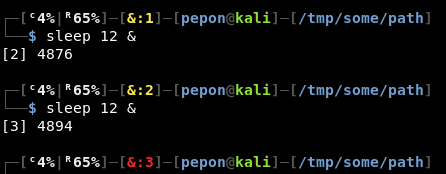
One background job, one stopped and last command didn't finish correctly:
