
macOS IOKit
Basic Information
The I/O Kit is an open-source, object-oriented device-driver framework in the XNU kernel, handles dynamically loaded device drivers. It allows modular code to be added to the kernel on-the-fly, supporting diverse hardware.
IOKit drivers will basically export functions from the kernel. These function parameter types are predefined and are verified. Moreover, similar to XPC, IOKit is just another layer on top of Mach messages.
IOKit XNU kernel code is opensourced by Apple in https://github.com/apple-oss-distributions/xnu/tree/main/iokit. Moreover, the user space IOKit components are also opensource https://github.com/opensource-apple/IOKitUser.
However, no IOKit drivers are opensource. Anyway, from time to time a release of a driver might come with symbols that makes it easier to debug it. Check how to get the driver extensions from the firmware here.
It's written in C++. You can get demangled C++ symbols with:
# Get demangled symbols
nm -C com.apple.driver.AppleJPEGDriver

# Demangled symbols from stdin
c++filt
__ZN16IOUserClient202222dispatchExternalMethodEjP31IOExternalMethodArgumentsOpaquePK28IOExternalMethodDispatch2022mP8OSObjectPv
IOUserClient2022::dispatchExternalMethod(unsigned int, IOExternalMethodArgumentsOpaque*, IOExternalMethodDispatch2022 const*, unsigned long, OSObject*, void*)
Caution
IOKit exposed functions could perform additional security checks when a client tries to call a function but note that the apps are usually limited by the sandbox to which IOKit functions they can interact with.
Drivers
In macOS they are located in:
/System/Library/Extensions- KEXT files built into the OS X operating system.
/Library/Extensions- KEXT files installed by 3rd party software
In iOS they are located in:
/System/Library/Extensions
#Use kextstat to print the loaded drivers
kextstat
Executing: /usr/bin/kmutil showloaded
No variant specified, falling back to release
Index Refs Address            Size       Wired      Name (Version) UUID <Linked Against>
    1  142 0                  0          0          com.apple.kpi.bsd (20.5.0) 52A1E876-863E-38E3-AC80-09BBAB13B752 <>
    2   11 0                  0          0          com.apple.kpi.dsep (20.5.0) 52A1E876-863E-38E3-AC80-09BBAB13B752 <>
    3  170 0                  0          0          com.apple.kpi.iokit (20.5.0) 52A1E876-863E-38E3-AC80-09BBAB13B752 <>
    4    0 0                  0          0          com.apple.kpi.kasan (20.5.0) 52A1E876-863E-38E3-AC80-09BBAB13B752 <>
    5  175 0                  0          0          com.apple.kpi.libkern (20.5.0) 52A1E876-863E-38E3-AC80-09BBAB13B752 <>
    6  154 0                  0          0          com.apple.kpi.mach (20.5.0) 52A1E876-863E-38E3-AC80-09BBAB13B752 <>
    7   88 0                  0          0          com.apple.kpi.private (20.5.0) 52A1E876-863E-38E3-AC80-09BBAB13B752 <>
    8  106 0                  0          0          com.apple.kpi.unsupported (20.5.0) 52A1E876-863E-38E3-AC80-09BBAB13B752 <>
    9    2 0xffffff8003317000 0xe000     0xe000     com.apple.kec.Libm (1) 6C1342CC-1D74-3D0F-BC43-97D5AD38200A <5>
   10   12 0xffffff8003544000 0x92000    0x92000    com.apple.kec.corecrypto (11.1) F5F1255F-6552-3CF4-A9DB-D60EFDEB4A9A <8 7 6 5 3 1>
Until the number 9 the listed drivers are loaded in the address 0. This means that those aren't real drivers but part of the kernel and they cannot be unloaded.
In order to find specific extensions you can use:
kextfind -bundle-id com.apple.iokit.IOReportFamily #Search by full bundle-id
kextfind -bundle-id -substring IOR #Search by substring in bundle-id
To load and unload kernel extensions do:
kextload com.apple.iokit.IOReportFamily
kextunload com.apple.iokit.IOReportFamily
IORegistry
The IORegistry is a crucial part of the IOKit framework in macOS and iOS which serves as a database for representing the system's hardware configuration and state. It's a hierarchical collection of objects that represent all the hardware and drivers loaded on the system, and their relationships to each other.
You can get the IORegistry using the cli ioreg to inspect it from the console (specially useful for iOS).
ioreg -l #List all
ioreg -w 0 #Not cut lines
ioreg -p <plane> #Check other plane
You could download IORegistryExplorer from Xcode Additional Tools from https://developer.apple.com/download/all/ and inspect the macOS IORegistry through a graphical interface.
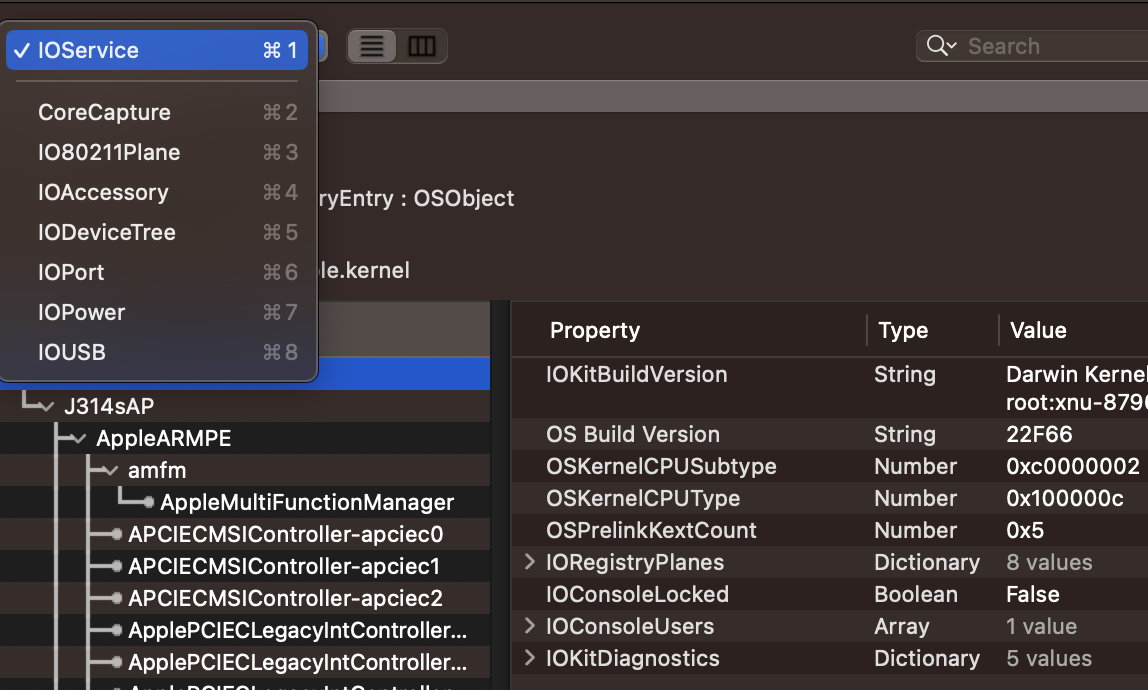
In IORegistryExplorer, "planes" are used to organize and display the relationships between different objects in the IORegistry. Each plane represents a specific type of relationship or a particular view of the system's hardware and driver configuration. Here are some of the common planes you might encounter in IORegistryExplorer:
- IOService Plane: This is the most general plane, displaying the service objects that represent drivers and nubs (communication channels between drivers). It shows the provider-client relationships between these objects.
- IODeviceTree Plane: This plane represents the physical connections between devices as they are attached to the system. It is often used to visualize the hierarchy of devices connected via buses like USB or PCI.
- IOPower Plane: Displays objects and their relationships in terms of power management. It can show which objects are affecting the power state of others, useful for debugging power-related issues.
- IOUSB Plane: Specifically focused on USB devices and their relationships, showing the hierarchy of USB hubs and connected devices.
- IOAudio Plane: This plane is for representing audio devices and their relationships within the system.
- ...
Driver Comm Code Example
The following code connects to the IOKit service YourServiceNameHere and calls selector 0:
- It first calls
IOServiceMatchingandIOServiceGetMatchingServicesto get the service. - It then establishes a connection calling
IOServiceOpen. - And it finally calls a function with
IOConnectCallScalarMethodindicating the selector 0 (the selector is the number the function you want to call has assigned).
Example user-space call to a driver selector
#import <Foundation/Foundation.h>
#import <IOKit/IOKitLib.h>

int main(int argc, const char * argv[]) {
    @autoreleasepool {
        // Get a reference to the service using its name
        CFMutableDictionaryRef matchingDict = IOServiceMatching("YourServiceNameHere");
        if (matchingDict == NULL) {
            NSLog(@"Failed to create matching dictionary");
            return -1;
        }

        // Obtain an iterator over all matching services
        io_iterator_t iter;
        kern_return_t kr = IOServiceGetMatchingServices(kIOMasterPortDefault, matchingDict, &iter);
        if (kr != KERN_SUCCESS) {
            NSLog(@"Failed to get matching services");
            return -1;
        }

        // Get a reference to the first service (assuming it exists)
        io_service_t service = IOIteratorNext(iter);
        if (!service) {
            NSLog(@"No matching service found");
            IOObjectRelease(iter);
            return -1;
        }

        // Open a connection to the service
        io_connect_t connect;
        kr = IOServiceOpen(service, mach_task_self(), 0, &connect);
        if (kr != KERN_SUCCESS) {
            NSLog(@"Failed to open service");
            IOObjectRelease(service);
            IOObjectRelease(iter);
            return -1;
        }

        // Call a method on the service
        // Assume the method has a selector of 0, and takes no arguments
        kr = IOConnectCallScalarMethod(connect, 0, NULL, 0, NULL, NULL);
        if (kr != KERN_SUCCESS) {
            NSLog(@"Failed to call method");
        }

        // Cleanup
        IOServiceClose(connect);
        IOObjectRelease(service);
        IOObjectRelease(iter);
    }
    return 0;
}
There are other functions that can be used to call IOKit functions apart of IOConnectCallScalarMethod like IOConnectCallMethod, IOConnectCallStructMethod...
Reversing driver entrypoint
You could obtain these for example from a firmware image (ipsw). Then, load it into your favourite decompiler.
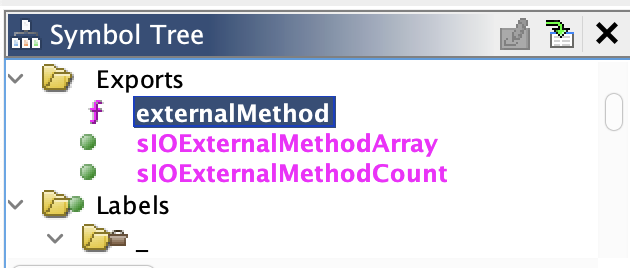
You could start decompiling the externalMethod function as this is the driver function that will be receiving the call and calling the correct function:
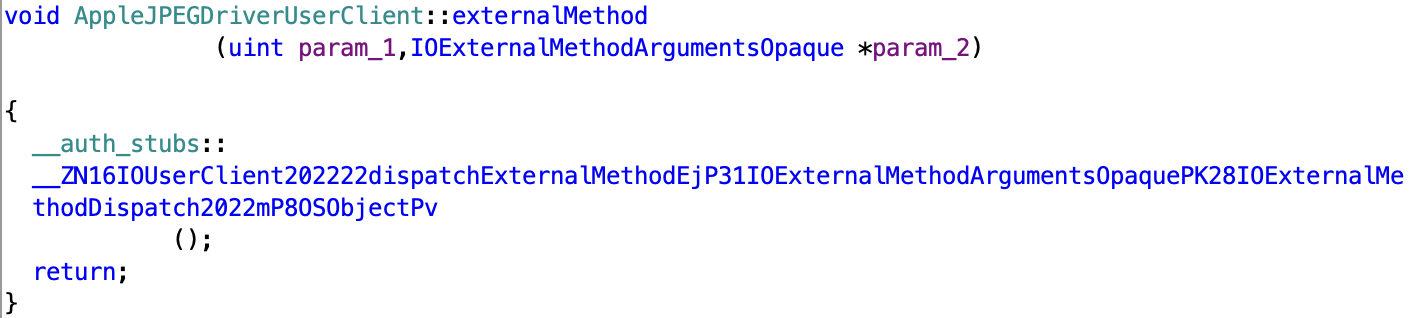
That awful call demagled means:
IOUserClient2022::dispatchExternalMethod(unsigned int, IOExternalMethodArgumentsOpaque*, IOExternalMethodDispatch2022 const*, unsigned long, OSObject*, void*)
Note how in the previous definition the self param is missed, the good definition would be:
IOUserClient2022::dispatchExternalMethod(self, unsigned int, IOExternalMethodArgumentsOpaque*, IOExternalMethodDispatch2022 const*, unsigned long, OSObject*, void*)
Actually, you can find the real definition in https://github.com/apple-oss-distributions/xnu/blob/1031c584a5e37aff177559b9f69dbd3c8c3fd30a/iokit/Kernel/IOUserClient.cpp#L6388:
IOUserClient2022::dispatchExternalMethod(uint32_t selector, IOExternalMethodArgumentsOpaque *arguments,
    const IOExternalMethodDispatch2022 dispatchArray[], size_t dispatchArrayCount,
    OSObject * target, void * reference)
With this info you can rewrite Ctrl+Right -> Edit function signature and set the known types:
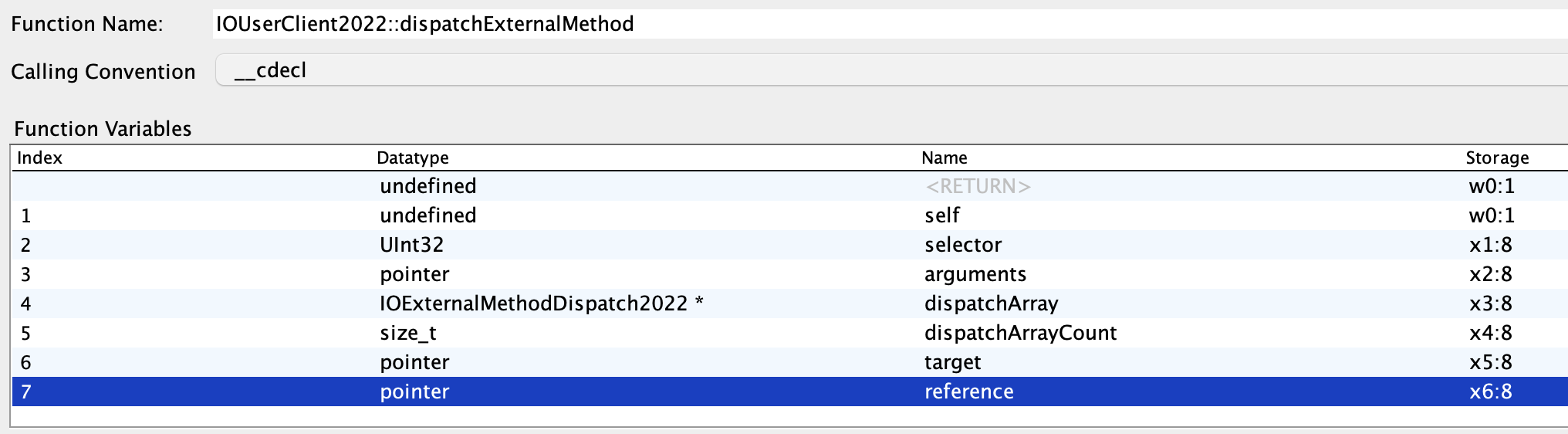
The new decompiled code will look like:
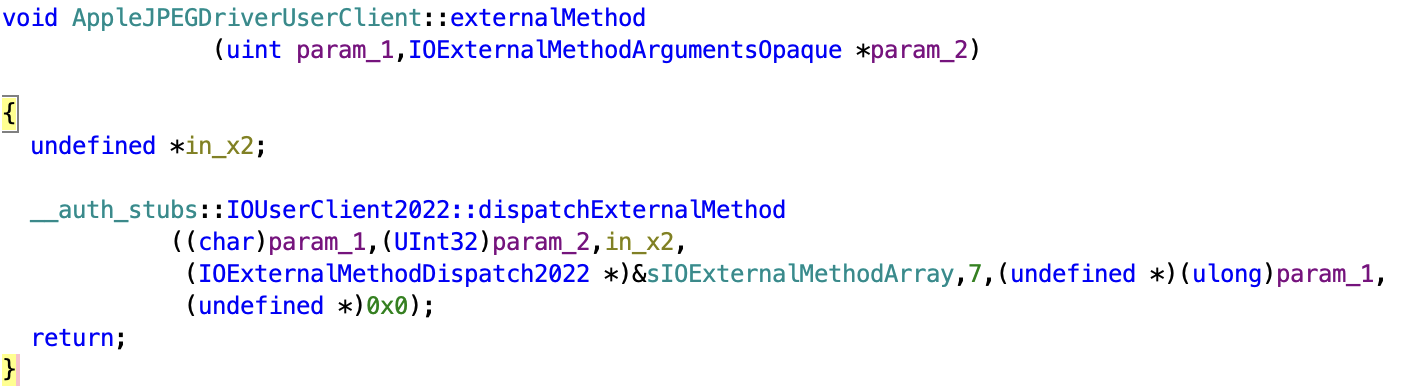
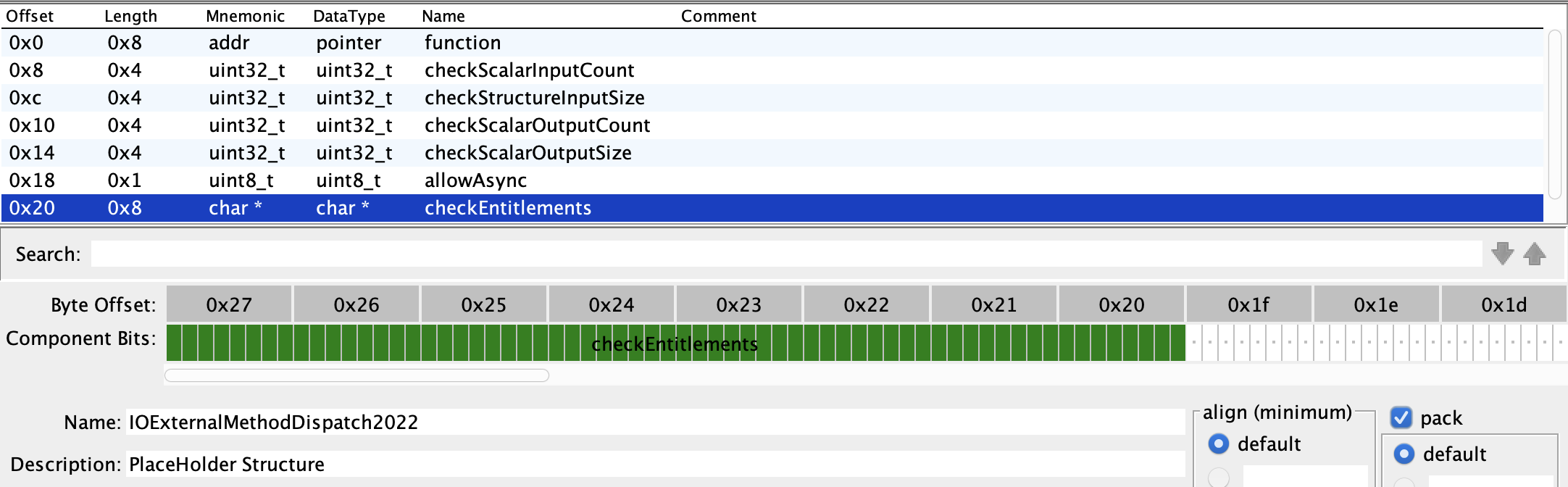
For the next step we need to have defined the IOExternalMethodDispatch2022 struct. It's opensource in https://github.com/apple-oss-distributions/xnu/blob/1031c584a5e37aff177559b9f69dbd3c8c3fd30a/iokit/IOKit/IOUserClient.h#L168-L176, you could define it:
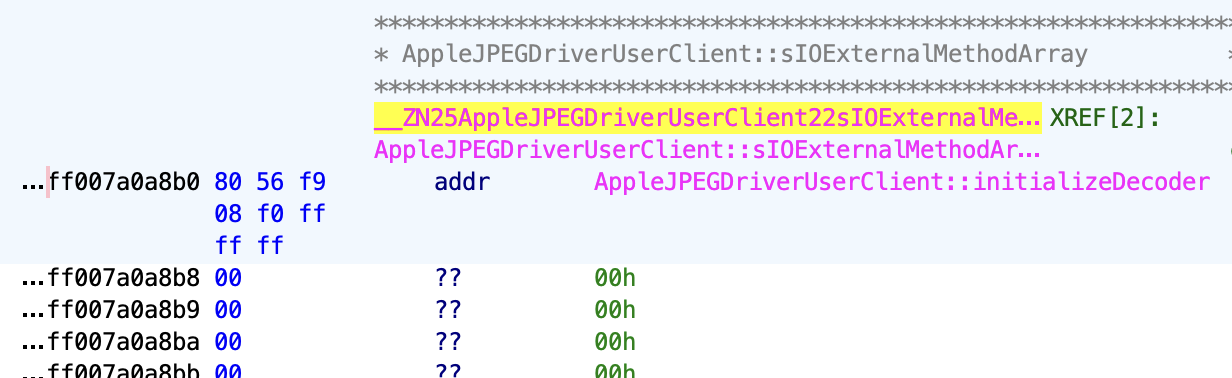
Now, following the (IOExternalMethodDispatch2022 *)&sIOExternalMethodArray you can see a lot of data:
Change the Data Type to IOExternalMethodDispatch2022:
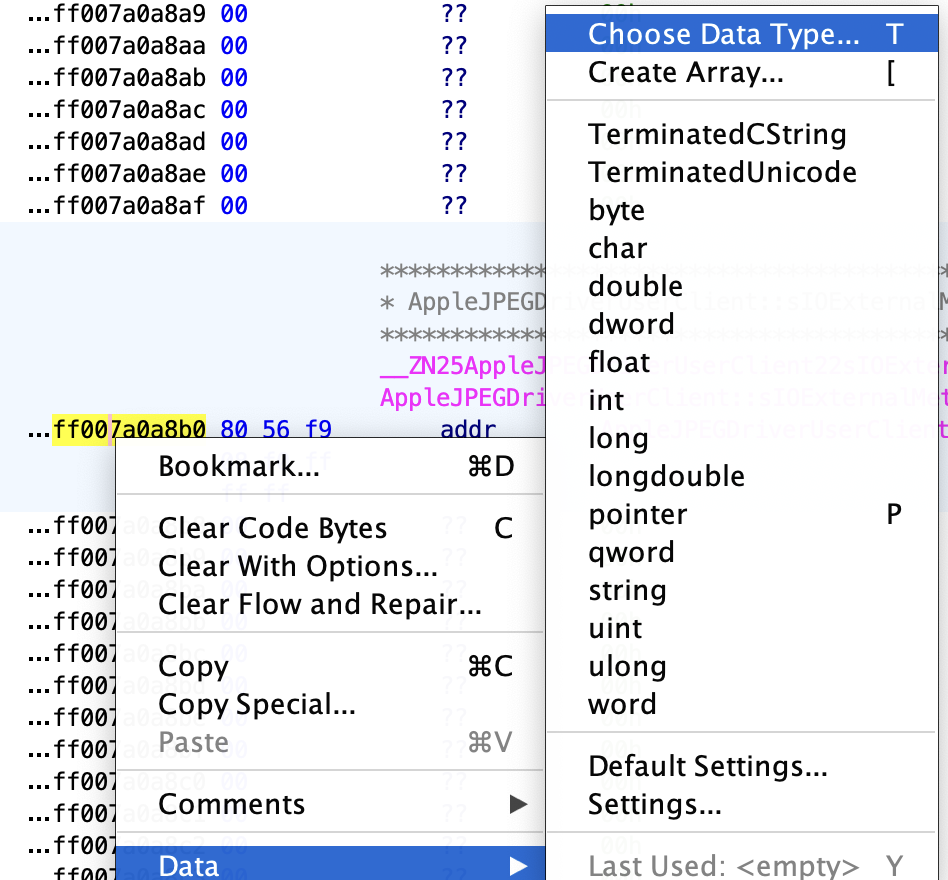
after the change:
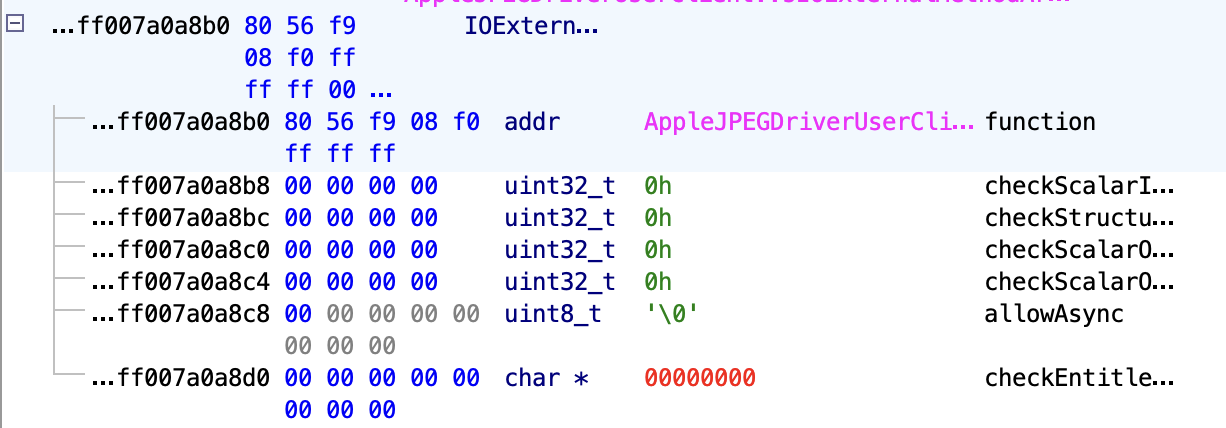
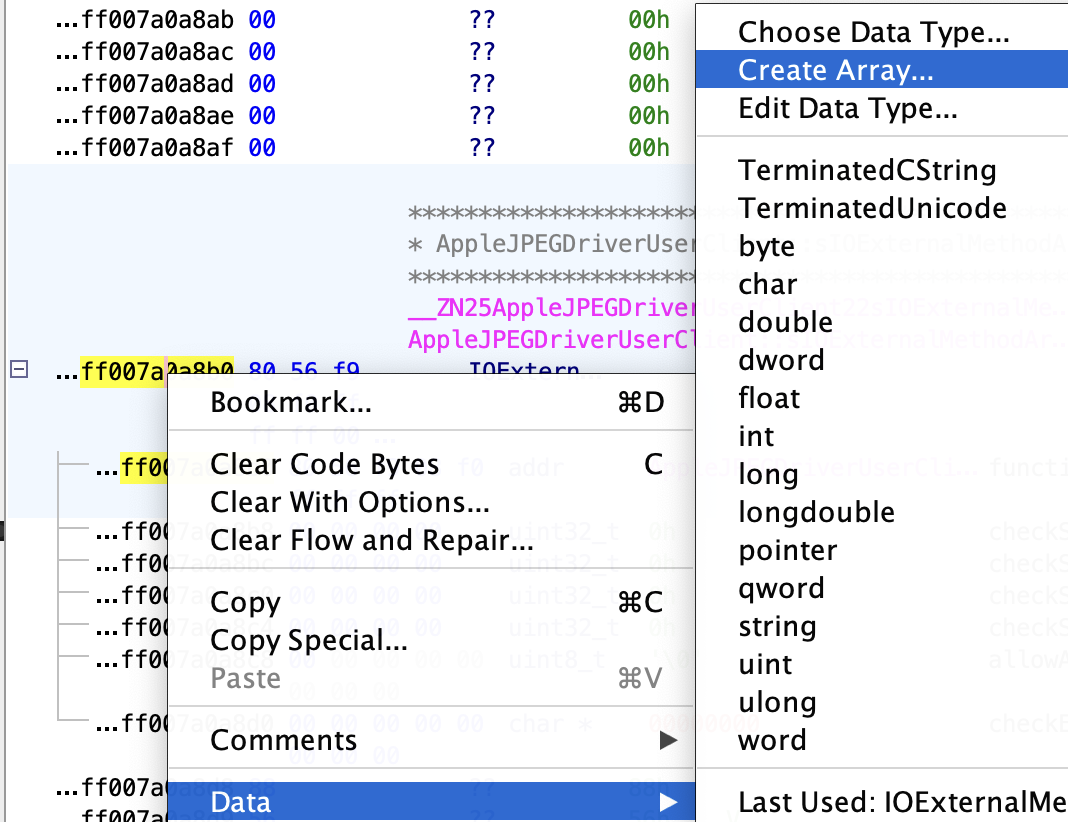
And as we now in there we have an array of 7 elements (check the final decompiled code), click to create an array of 7 elements:
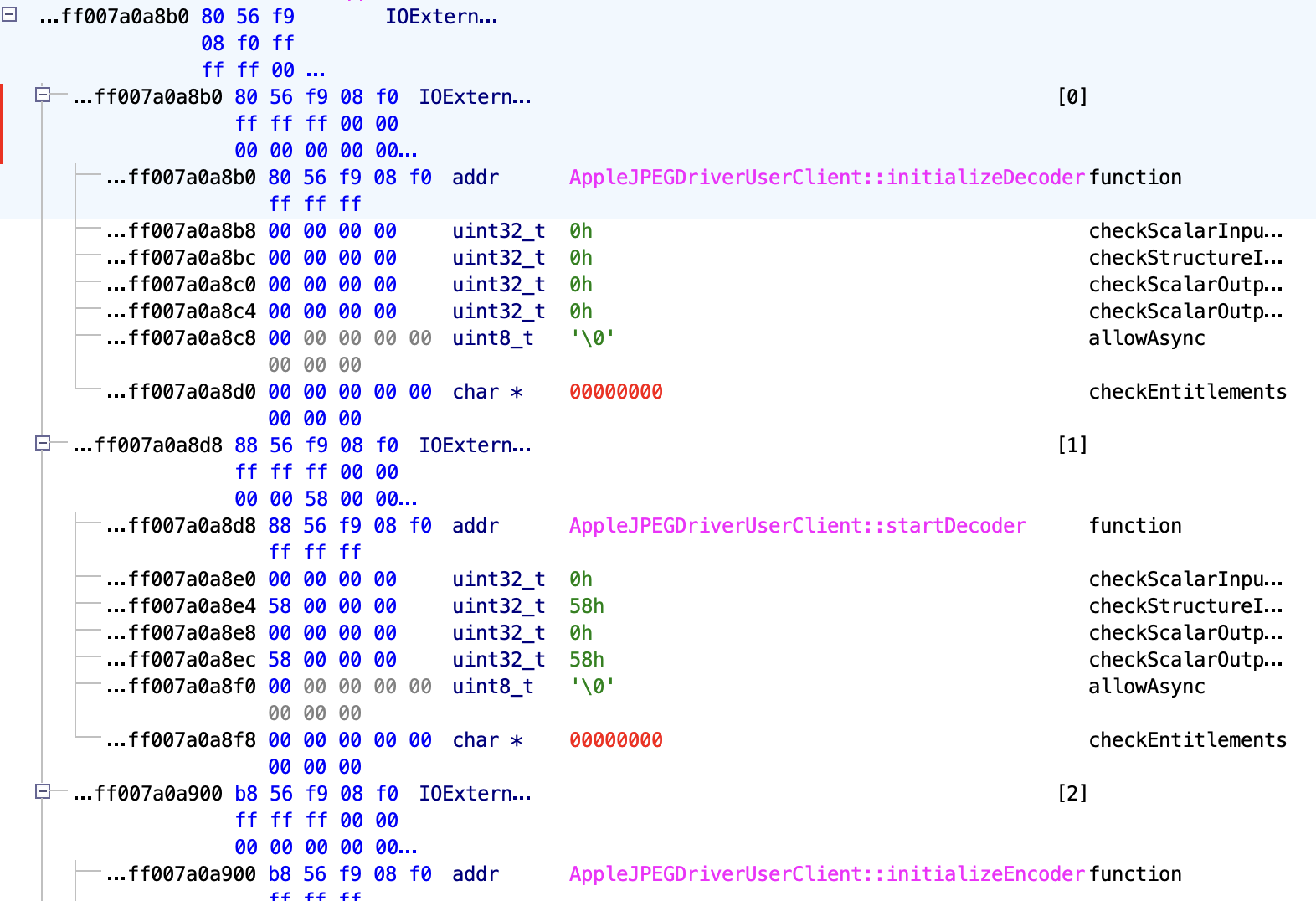
After the array is created you can see all the exported functions:
Tip
If you remember, to call an exported function from user space we don't need to call the name of the function, but the selector number. Here you can see that the selector 0 is the function initializeDecoder, the selector 1 is startDecoder, the selector 2 initializeEncoder...
Recent IOKit attack surface (2023–2025)
- Keystroke capture via IOHIDFamily – CVE-2024-27799 (14.5) showed a permissive
IOHIDSystemclient could grab HID events even with secure input; ensureexternalMethodhandlers enforce entitlements instead of only the user-client type. - IOGPUFamily memory corruption – CVE-2024-44197 and CVE-2025-24257 fixed OOB writes reachable from sandboxed apps that pass malformed variable-length data to GPU user clients; the usual bug is poor bounds around
IOConnectCallStructMethodarguments. - Legacy keystroke monitoring – CVE-2023-42891 (14.2) confirmed HID user clients remain a sandbox-escape vector; fuzz any driver exposing keyboard/event queues.
Quick triage & fuzzing tips
- Enumerate all external methods for a user client from userland to seed a fuzzer:
# list selectors for a service
python3 - <<'PY'
from ioreg import IORegistry
svc = 'IOHIDSystem'
reg = IORegistry()
obj = reg.get_service(svc)
for sel, name in obj.external_methods():
    print(f"{sel:02d} {name}")
PY
- When reversing, pay attention to
IOExternalMethodDispatch2022counts. A common bug pattern in recent CVEs is inconsistentstructureInputSize/structureOutputSizevs. actualcopyinlength, leading to heap OOB inIOConnectCallStructMethod. - Sandbox reachability still hinges on entitlements. Before spending time on a target, check if the client is allowed from a third‑party app:
strings /System/Library/Extensions/IOHIDFamily.kext/Contents/MacOS/IOHIDFamily | \
  grep -E "^com\.apple\.(driver|private)"
- For GPU/iomfb bugs, passing oversized arrays through
IOConnectCallMethodis often enough to trigger bad bounds. Minimal harness (selector X) to trigger size confusion:
uint8_t buf[0x1000];
size_t outSz = sizeof(buf);
IOConnectCallStructMethod(conn, X, buf, sizeof(buf), buf, &outSz);
DriverKit — User-Space Drivers
Basic Information
DriverKit is Apple's user-space replacement for kernel extensions (kexts), introduced in macOS 10.15. DriverKit binaries (.dext bundles) run as user-space processes but communicate directly with the kernel through a privileged IOKit interface.
DriverKit extensions manage hardware: - USB controllers and devices - Thunderbolt / PCIe devices - HID (keyboards, mice, game controllers) - Audio hardware - Networking interfaces - Serial and Block Storage devices
Unlike kexts (which required SIP-disabled boot or notarization), DriverKit extensions are installed via SystemExtensions.framework and only require one-time user approval.
Discovery & Enumeration
# List all installed system extensions (includes DriverKit)
systemextensionsctl list

# Find all DriverKit extension bundles
find / -name "*.dext" -type d 2>/dev/null

# Check a binary's DriverKit entitlements
codesign -d --entitlements - /path/to/binary.dext/binary 2>&1 | grep driverkit

# Common DriverKit entitlements:
# com.apple.developer.driverkit                    — Base DriverKit
# com.apple.developer.driverkit.transport.usb      — USB device access
# com.apple.developer.driverkit.transport.hid      — HID device access
# com.apple.developer.driverkit.transport.pci      — PCIe device access
# com.apple.developer.driverkit.transport.serial   — Serial port access
# com.apple.developer.driverkit.family.networking  — Network interface
# com.apple.developer.driverkit.family.audio       — Audio device
Security Implications
Warning
DriverKit binaries have a direct communication channel to the kernel. Sending malformed messages through this channel can trigger kernel vulnerabilities. Each driver registers specific user-client classes, and malformed IOConnectCallMethod calls can cause kernel memory corruption.
Attack surface: 1. Kernel IOKit message fuzzing — Each DriverKit user-client exposes selectors callable from user space. Malformed arguments trigger kernel bugs. 2. USB device spoofing — A compromised USB DriverKit binary can present a malicious USB device profile (e.g., emulate a keyboard for HID injection). 3. DMA attacks — PCIe/Thunderbolt DriverKit extensions have potential DMA access to physical memory. 4. Persistence — Once installed as a system extension, DriverKit binaries persist across reboots and app updates.
DriverKit IOKit User-Client Fuzzing
# Enumerate DriverKit user-client classes from entitlements
codesign -d --entitlements - /path/to/binary.dext/binary 2>&1 \
  | grep -A5 "com.apple.developer.driverkit.transport"

# List IOService matching for DriverKit drivers
ioreg -l | grep -i "UserClientClass" | sort -u

# Check if the driver's user-client is reachable from a sandboxed app
ioreg -c IOService -r -d 1 | grep -E '"IOClass"|"CFBundleIdentifier"' | head -40

# Minimal fuzzing harness for a DriverKit selector:
#include <IOKit/IOKitLib.h>

io_connect_t conn;
// ... open connection to the DriverKit service ...

// Fuzz selector X with oversized struct input
uint8_t buf[0x2000];
memset(buf, 'A', sizeof(buf));
size_t outSz = sizeof(buf);
kern_return_t kr = IOConnectCallStructMethod(conn, X, buf, sizeof(buf), buf, &outSz);
// If the driver doesn't validate structureInputSize, this causes kernel OOB
DriverKit CVEs
| CVE | Description |
|---|---|
| CVE-2022-26766 | DriverKit USB stack vulnerability — kernel code execution |
| CVE-2021-30838 | IOKit user-client type confusion in graphic drivers |
| CVE-2024-44197 | IOGPUFamily OOB write via malformed DriverKit arguments |