
Unicode Normalization
This is a summary of: https://appcheck-ng.com/unicode-normalization-vulnerabilities-the-special-k-polyglot/. Check it for further details (images taken from there).
Understanding Unicode and Normalization
Unicode normalization is a process that ensures different binary representations of characters are standardized to the same binary value. This process is crucial in dealing with strings in programming and data processing. The Unicode standard defines two types of character equivalence:
- Canonical Equivalence: Characters are considered canonically equivalent if they have the same appearance and meaning when printed or displayed.
- Compatibility Equivalence: A weaker form of equivalence where characters may represent the same abstract character but can be displayed differently.
There are four Unicode normalization algorithms: NFC, NFD, NFKC, and NFKD. Each algorithm employs canonical and compatibility normalization techniques differently. For a more in-depth understanding, you can explore these techniques on Unicode.org.
For offensive testing, NFKC/NFKD are usually the most interesting forms because they can fold compatibility characters (fullwidth symbols, superscripts, modifier letters, ligatures, etc.) into plain ASCII. Also, don't mix this with homoglyph/confusable detection: two strings can look identical to a human and still not normalize to the same bytes. For phishing/IDN lookalikes check Homograph / Homoglyph Attacks.
Key Points on Unicode Encoding
Understanding Unicode encoding is pivotal, especially when dealing with interoperability issues among different systems or languages. Here are the main points:
- Code Points and Characters: In Unicode, each character or symbol is assigned a numerical value known as a "code point".
- Bytes Representation: The code point (or character) is represented by one or more bytes in memory. For instance, LATIN-1 characters (common in English-speaking countries) are represented using one byte. However, languages with a larger set of characters need more bytes for representation.
- Encoding: This term refers to how characters are transformed into a series of bytes. UTF-8 is a prevalent encoding standard where ASCII characters are represented using one byte, and up to four bytes for other characters.
- Processing Data: Systems processing data must be aware of the encoding used to correctly convert the byte stream into characters.
- Variants of UTF: Besides UTF-8, there are other encoding standards like UTF-16 (using a minimum of 2 bytes, up to 4) and UTF-32 (using 4 bytes for all characters).
It's crucial to comprehend these concepts to effectively handle and mitigate potential issues arising from Unicode's complexity and its various encoding methods.
An example of how Unicode normalizes two different byte sequences representing the same character:
unicodedata.normalize("NFKD","chloe\u0301") == unicodedata.normalize("NFKD", "chlo\u00e9")
A list of Unicode equivalent characters can be found here: https://appcheck-ng.com/wp-content/uploads/unicode_normalization.html and https://0xacb.com/normalization_table
Discovering
If you can find inside a webapp a value that is being echoed back, you could try to send ‘KELVIN SIGN’ (U+0212A) which normalises to "K" (you can send it as %e2%84%aa). If a "K" is echoed back, then, some kind of Unicode normalisation is being performed.
Another example: %F0%9D%95%83%E2%85%87%F0%9D%99%A4%F0%9D%93%83%E2%85%88%F0%9D%94%B0%F0%9D%94%A5%F0%9D%99%96%F0%9D%93%83 after unicode is Leonishan.
A quick way to locally triage candidate characters before sending them to a target is:
import unicodedata, urllib.parse

for c in ["\u212A", "\uFF07", "\uFF02", "\uFF0F", "\uFE64", "\uFE65", "\u00AD"]:
    print(hex(ord(c)), urllib.parse.quote(c), unicodedata.normalize("NFKC", c))
Vulnerable Examples
SQL Injection filter bypass
Imagine a web page that is using the character ' to create SQL queries with the user input. This web, as a security measure, deletes all occurrences of the character ' from the user input, but after that deletion and before the creation of the query, it normalises using Unicode the input of the user.
Then, a malicious user could insert a different Unicode character equivalent to ' (0x27) like %ef%bc%87 , when the input gets normalised, a single quote is created and a SQLInjection vulnerability appears:
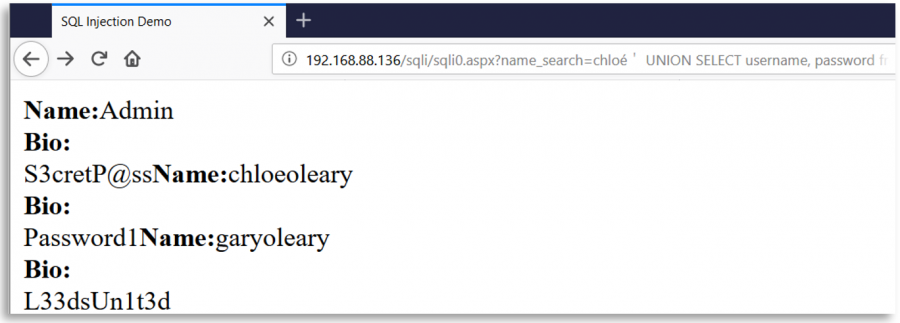
Some interesting Unicode characters
o-- %e1%b4%bcr-- %e1%b4%bf1-- %c2%b9=-- %e2%81%bc/-- %ef%bc%8f--- %ef%b9%a3#-- %ef%b9%9f*-- %ef%b9%a1'-- %ef%bc%87"-- %ef%bc%82|-- %ef%bd%9c
' or 1=1-- -
%ef%bc%87+%e1%b4%bc%e1%b4%bf+%c2%b9%e2%81%bc%c2%b9%ef%b9%a3%ef%b9%a3+%ef%b9%a3

" or 1=1-- -
%ef%bc%82+%e1%b4%bc%e1%b4%bf+%c2%b9%e2%81%bc%c2%b9%ef%b9%a3%ef%b9%a3+%ef%b9%a3

' || 1==1//
%ef%bc%87+%ef%bd%9c%ef%bd%9c+%c2%b9%e2%81%bc%e2%81%bc%c2%b9%ef%bc%8f%ef%bc%8f

" || 1==1//
%ef%bc%82+%ef%bd%9c%ef%bd%9c+%c2%b9%e2%81%bc%e2%81%bc%c2%b9%ef%bc%8f%ef%bc%8f
sqlmap template
https://github.com/carlospolop/sqlmap_to_unicode_template
XSS (Cross Site Scripting)
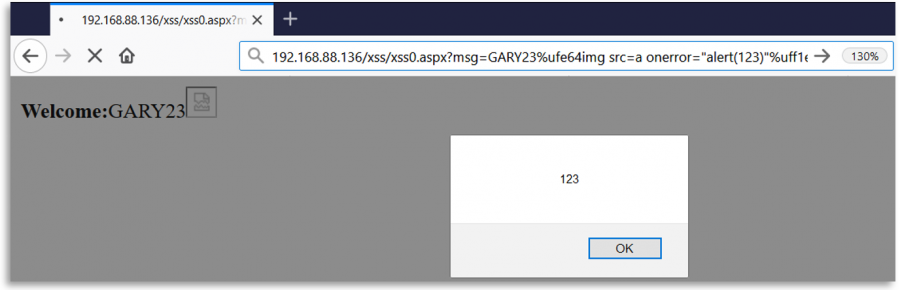
You could use one of the following characters to trick the webapp and exploit a XSS:
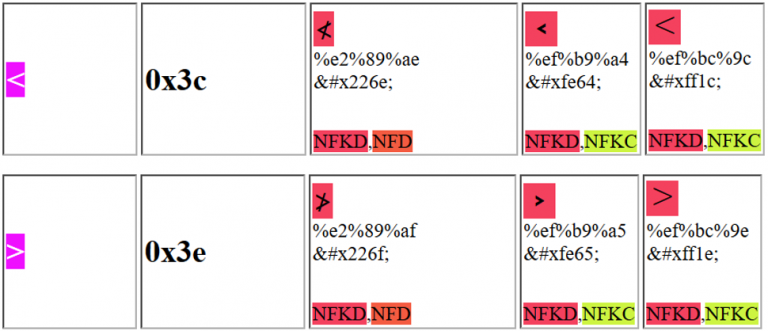
Notice that for example the first Unicode character proposed can be sent as: %e2%89%ae or as %u226e
Account / identifier collisions
A very common real-world pattern is not direct SQLi/XSS but cross-endpoint normalization mismatches:
- Signup / invite accepts raw Unicode and stores it
- Login / password reset / admin search / SSO callback canonicalizes with NFC/NFKC,
casefold(), IDNA or a custom transliteration library - The uniqueness check, lookup or session binding hits the wrong account
When testing accounts, replay the same logical identifier through every flow using raw, lowercase, casefold(), NFC, NFKC, punycode and compatibility characters. Useful canaries are K, fullwidth forms, combining marks and soft hyphen. If one endpoint reflects/stores the raw value but another one matches a canonicalized version, you may have duplicate-account creation, password-reset confusion or zero-interaction ATO conditions.
Fuzzing Regexes
When the backend is checking user input with a regex, it might be possible that the input is being normalized for the regex but not for where it's being used. For example, in an Open Redirect or SSRF the regex might be normalizing the sent URL but then accessing it as is.
The tool recollapse allows to generate variations of the input to fuzz the backend. Especially interesting modes are:
3: normalization6: case folding / upper / lower7: byte truncation
recollapse -m 3,6,7 -e 1 'https://legit.example.com'
echo '<svg/onload=alert(1)>' | recollapse | ffuf -w - -u 'https://target/?q=FUZZ' -mc all
For more info check the github repo and this post.
Cookie / prefix confusion with Unicode whitespace
The same bug class also appears in cookie parsing: the browser stores/sends one cookie name, but the server later trims or normalizes it before applying security rules. If you can inject cookies from a subdomain, response splitting, or XSS, try leading Unicode whitespace before __Host- / __Secure- names and check whether the backend strips it before parsing or validation.
document.cookie = `${String.fromCodePoint(0x2000)}__Host-session=fixated; Domain=.example.com; Path=/; Secure`;
document.cookie = `${String.fromCodePoint(0x00A0)}__Secure-session=fixated; Domain=.example.com; Path=/; Secure`;
This is highly implementation-dependent, but recent research showed that some server-side frameworks trim a surprisingly wide range of Unicode whitespace while browsers do not all enforce prefix rules the same way. Treat this as a parser discrepancy / canonicalization test whenever cookies are security-critical.
Best-Fit / WorstFit translations on Windows
This is not standard Unicode normalization, but the exploitation pattern is identical: a security control sees a safe Unicode character, and a later Unicode-to-ANSI conversion turns it into dangerous ASCII. On Windows, U+00AD (soft hyphen) can become - on code pages such as 932 / 936 / 950, which recently led to practical argument injection and can also affect path traversal, argument splitting, and environment-variable confusion when ANSI APIs are reached later.
Practical probes:
- Prefix option-like inputs with
%ADand look for-in logs, error messages or downstream process arguments - Re-test Windows-backed sinks that eventually hit CLI wrappers, archive extractors, CGI binaries or narrow-char filesystem APIs
- Combine
%ADwith other compatibility characters such as fullwidth slash%EF%BC%8Fwhen the sink reaches path handling
Unicode Overflow
From this blog, the maximum value of a byte is 255, if the server is vulnerable, an overflow can be crafted to produce a specific and unexpected ASCII character. For example, the following characters will be converted to A:
- 0x4e41
- 0x4f41
- 0x5041
- 0x5141
This is especially interesting when a sink stores a Unicode value in a single byte or otherwise truncates code points before validation/execution. The same research also showed a useful client-side variant with JavaScript fromCharCode() overflow:
String.fromCharCode(0x10000 + 0x31, 0x10000 + 0x33, 0x10000 + 0x33, 0x10000 + 0x37) // 1337
PortSwigger also added checks/helpers for this class in ActiveScan++, Hackvertor, and the Shazzer Unicode table, so it is worth automating whenever you find brittle ASCII blocklists.
References
- https://labs.spotify.com/2013/06/18/creative-usernames/
- https://security.stackexchange.com/questions/48879/why-does-directory-traversal-attack-c0af-work
- https://jlajara.gitlab.io/posts/2020/02/19/Bypass_WAF_Unicode.html
- https://portswigger.net/research/bypassing-character-blocklists-with-unicode-overflows
- https://portswigger.net/research/cookie-chaos-how-to-bypass-host-and-secure-cookie-prefixes
- https://devco.re/blog/2025/01/09/worstfit-unveiling-hidden-transformers-in-windows-ansi/