
DOM Invader
DOM Invader
DOM Invader is a browser tool installed in Burp Suite's built-in Chromium browser. It assists in detecting DOM XSS and other client-side vulnerabilities (prototype pollution, DOM clobbering, etc.) by automatically instrumenting JavaScript sources and sinks. The extension ships with Burp and only needs to be enabled.
DOM Invader adds a tab to the browser’s DevTools panel that lets you:
- Identify controllable sinks in real time, including context (attribute, HTML, URL, JS) and applied sanitization.
- Log, edit and resend
postMessage()web-messages, or let the extension mutate them automatically. - Detect client-side prototype-pollution sources and scan for gadget→sink chains, generating PoCs on-the-fly.
- Find DOM clobbering vectors (e.g.
id/namecollisions that overwrite global variables). - Fine-tune behaviour via a rich Settings UI (custom canary, auto-injection, redirect blocking, source/sink lists, etc.).
1. Enable it
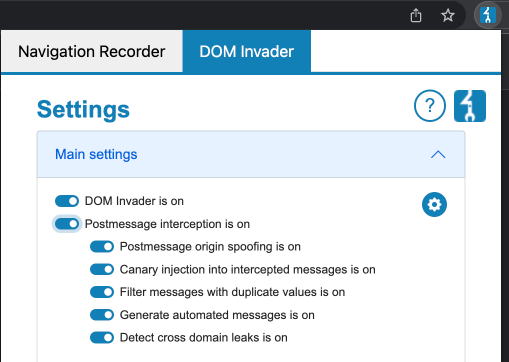
- Open Proxy ➜ Intercept ➜ Open Browser (Burp’s embedded browser).
- Click the Burp Suite logo (top-right). If it’s hidden, click the jigsaw-piece first.
- In DOM Invader tab, toggle Enable DOM Invader ON and press Reload.
- Open DevTools (
F12/ Right-click ➜ Inspect ) and dock it. A new DOM Invader panel appears.
Burp remembers the state per profile. Disable it under Settings ➜ Tools ➜ Burp’s browser ➜ Store settings... if required.
2. Inject a Canary
A canary is a random marker string (e.g. xh9XKYlV) that DOM Invader tracks. You can:
- Copy it and manually inject it in parameters, forms, Web-Socket frames, web-messages, etc.
- Use Inject URL params / Inject forms buttons to open a new tab where the canary is appended to every query key/value or form field automatically.
- Search for an empty canary to reveal all sinks regardless of exploitability (great for reconnaissance).
Custom canary (2025+)
Burp 2024.12 introduced Canary settings (Burp-logo ➜ DOM Invader ➜ Canary). You can:
- Randomize or set a custom string (helpful for multi-tab testing or when the default value appears naturally on the page).
- Copy the value to clipboard.
- Changes require Reload.
3. Web-messages (postMessage)
The Messages sub-tab records every window.postMessage() call, showing origin, source, and data usage.
• Modify & resend: double-click a message, edit data, and press Send (Burp Repeater-like).
• Auto-fuzz: enable Postmessage interception ➜ Auto-mutate in settings to let DOM Invader generate canary-based payloads and replay them to the handler.
Field meaning recap:
- origin – whether the handler validates
event.origin. - data – payload location. If unused, the sink is irrelevant.
- source – iframe / window reference validation; often weaker than strict‐origin checking.
4. Prototype Pollution
Enable under Settings ➜ Attack types ➜ Prototype pollution.
Workflow:
- Browse – DOM Invader flags pollution sources (
__proto__,constructor,prototype) found in URL/query/hash or JSON web-messages. - Test – clicks Test to open a PoC tab where
Object.prototype.testpropertyshould exist:
let obj = {};
console.log(obj.testproperty); // ➜ 'DOM_INVADER_PP_POC'
innerHTML).
4. Exploit – when a gadget-sink chain is found an Exploit button appears that chains source + gadget + sink to trigger alert.
Advanced settings (cog icon):
- Remove CSP / X-Frame-Options to keep iframes workable during gadget scanning.
- Scan techniques in separate frames to avoid
__proto__vsconstructorinterference. - Disable techniques individually for fragile apps.
5. DOM Clobbering
Toggle Attack types ➜ DOM clobbering. DOM Invader monitors dynamically created elements whose id/name attributes collide with global variables or form objects (<input name="location"> → clobbers window.location). An entry is produced whenever user-controlled markup leads to variable replacement.
6. Settings Overview (2025)
DOM Invader is now split into Main / Attack Types / Misc / Canary categories.
- Main
- Enable DOM Invader – global switch.
- Postmessage interception – turn on/off message logging; sub-toggles for auto-mutation.
-
Custom Sources/Sinks – cog icon ➜ enable/disable specific sinks (e.g.
eval,setAttribute) that may break the app. -
Attack Types
- Prototype pollution (with per-technique settings).
-
DOM clobbering.
-
Misc
- Redirect prevention – block client-side redirects so the sink list isn’t lost.
- Breakpoint before redirect – pause JS just before redirect for call-stack inspection.
-
Inject canary into all sources – auto-inject canary everywhere; configurable source/parameter allow-list.
-
Canary
- View / randomize / set custom canary; copy to clipboard. Changes require browser reload.
7. Tips & Good Practices
- Use distinct canary – avoid common strings like
test, otherwise false-positives occur. - Disable heavy sinks (
eval,innerHTML) temporarily if they break page functionality during navigation. - Combine with Burp Repeater & Proxy – replicate the browser request/response that produced a vulnerable state and craft final exploit URLs.
- Remember frame scope – sources/sinks are displayed per browsing context; vulnerabilities inside iframes might need manual focus.
- Export evidence – right-click the DOM Invader panel ➜ Save screenshot to include in reports.
References
- https://portswigger.net/burp/documentation/desktop/tools/dom-invader
- https://portswigger.net/burp/documentation/desktop/tools/dom-invader/enabling
- https://portswigger.net/burp/documentation/desktop/tools/dom-invader/dom-xss
- https://portswigger.net/burp/documentation/desktop/tools/dom-invader/web-messages
- https://portswigger.net/burp/documentation/desktop/tools/dom-invader/prototype-pollution
- https://portswigger.net/burp/documentation/desktop/tools/dom-invader/dom-clobbering
- https://portswigger.net/burp/documentation/desktop/tools/dom-invader/settings/canary
- https://portswigger.net/burp/documentation/desktop/tools/dom-invader/settings/misc